If you’ve ever used Otter.ai, you’ve probably had moments where you thought: “That’s not what I said.”
You’re not alone.
Otter AI is powerful, fast, and incredibly useful—but it’s not perfect. And if you want to get the best out of it, you need to understand what it gets wrong and why those errors happen.
In this guide, we’ll break down the most common Otter AI transcription errors, explain the reasons behind them, and show you how to deal with them. If you’re just getting started, you can also explore Otter AI Transcription Accuracy Test: How Reliable Is It in 2026?
For a full overview, check Review of Otter AI.
Table of Contents
Why Does Otter AI Make Transcription Errors?
Before diving into specific mistakes, it’s important to understand the root cause.
Otter AI relies on speech recognition models trained on large datasets. While these models are advanced, they don’t truly “understand” language the way humans do. Instead, they predict words based on patterns, probabilities, and audio input.
This works well when the audio is clear and predictable. But when speech becomes complex—due to accents, noise, speed, or context—the system starts making guesses. And that’s where errors come in.
In most real-world scenarios, Otter AI operates at around 80–95% accuracy, which means some level of error is expected.
Common Otter AI Transcription Errors
Not all errors are the same. Some are minor and harmless, while others can change meaning entirely. Let’s break down the most common ones.
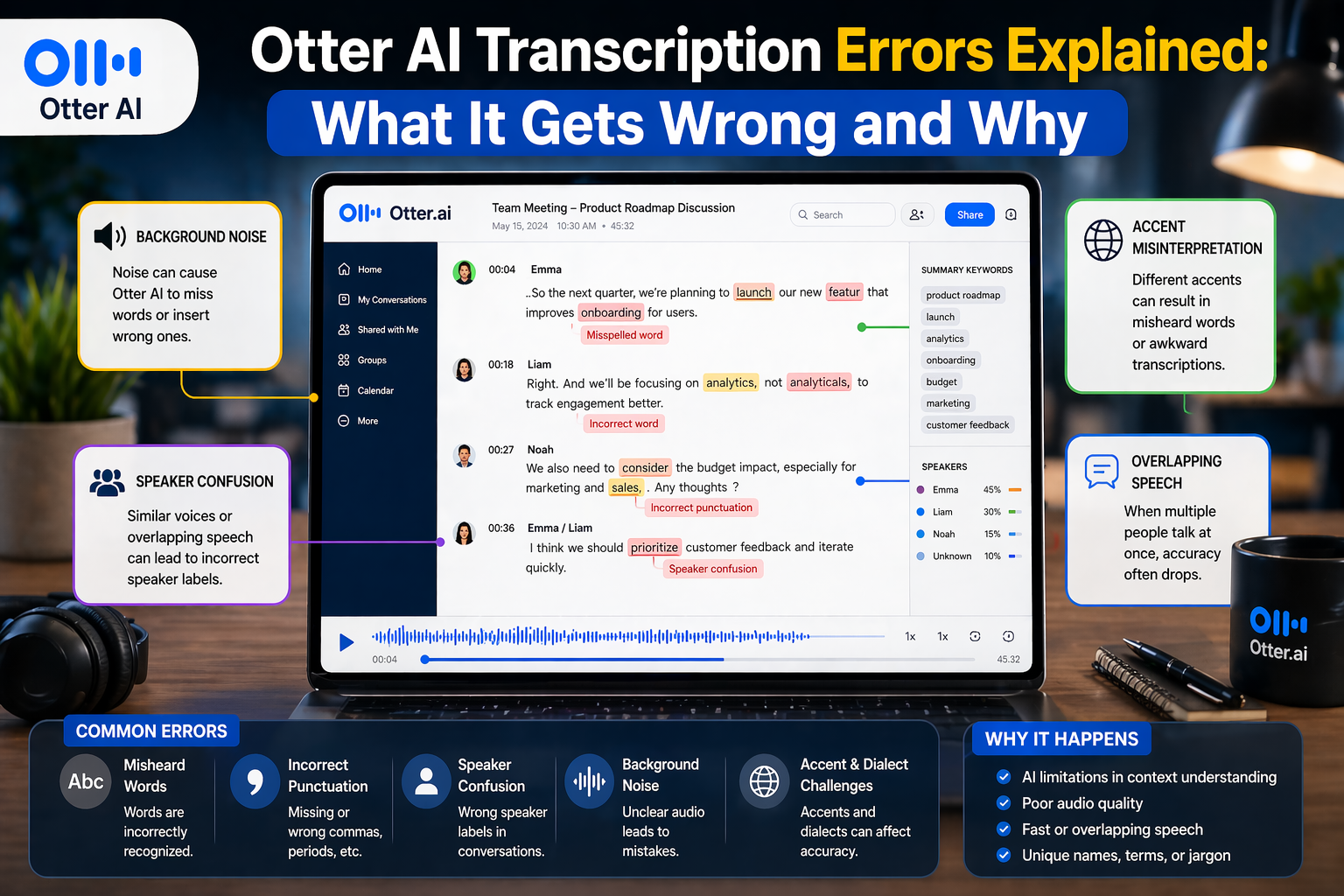
Misheard Words (Substitution Errors)
This is the most common type of error.
Otter AI sometimes replaces a word with another that sounds similar. For example, “data” might become “dater,” or “model” might become “modal.” These errors usually happen when pronunciation is unclear or when the AI is unsure.
In casual use, these mistakes are easy to spot. But in technical or professional contexts, they can cause confusion or misinterpretation.
Missing Words (Omission Errors)
Sometimes, Otter AI simply skips words.
This often happens when speech is too fast, unclear, or interrupted. The AI prioritizes what it can confidently recognize, so less certain words may be dropped entirely.
Missing words can be subtle but important, especially when they affect sentence meaning or tone.
Extra or Incorrect Words (Insertion Errors)
In some cases, Otter AI adds words that weren’t actually spoken.
This usually happens when background noise or unclear audio is mistaken for speech. The AI tries to “fill in the gaps,” which can lead to unexpected or incorrect words appearing in the transcript.
These errors are more common in noisy environments or low-quality recordings.
Speaker Identification Errors
In meetings or interviews, Otter AI attempts to label speakers—but it doesn’t always get it right.
When multiple people are talking, especially with similar voices or overlapping speech, the system may confuse who said what. This can lead to misattributed statements, which can be a serious issue in professional or journalistic contexts.
As discussed in Otter AI Accuracy for Meetings: Can It Capture Everything Correctly?, speaker confusion is one of the biggest challenges in multi-person conversations.
Errors with Accents and Pronunciation
Accents are one of the biggest sources of transcription errors.
Otter AI performs best with standard accents, but struggles with strong regional or non-native speech patterns. Words may be misinterpreted, replaced, or completely missed.
This aligns with what we covered in Does Otter AI Work for Accents? Accuracy Test with Real Examples, where accuracy dropped significantly with unfamiliar accents.
Technical Terms and Names
Proper nouns are another weak point.
Otter AI often misinterprets names, brand terms, or specialized vocabulary—especially if they’re not common in its training data. For example, a company name or technical term might be replaced with a similar-sounding everyday word.
This is particularly important in business, academic, or journalism settings, where accuracy matters.
Punctuation and Formatting Errors
Even when the words are correct, punctuation can be off.
Otter AI may place commas or periods incorrectly, break sentences in the wrong place, or fail to capture tone. This can make transcripts harder to read or slightly change the meaning of a sentence.
While these errors are easier to fix, they still require attention during editing.
What Causes These Errors in Real Use?
Now that we’ve seen the types of errors, let’s look at what actually causes them.
Audio quality is the biggest factor. Poor microphones, background noise, and unstable recordings make it harder for the AI to interpret speech correctly.
Speech patterns also matter. Fast talking, overlapping conversations, and informal language all increase the likelihood of errors.
Accents and pronunciation play a major role, especially when they differ from the AI’s training data.
Finally, context is something AI still struggles with. Humans can use context to understand unclear speech, but AI relies more on probability, which can lead to incorrect guesses.
Real-World Example of Otter AI Errors
To make this more practical, here’s a simple example.
Original speech:
“We need to finalize the data model before Friday.”
Otter AI transcription:
“We need to finalize the dater modal before Friday.”
At first glance, it looks similar—but the meaning is slightly distorted. In technical contexts, this kind of error can create confusion or require clarification.
From experience, these types of errors are common but usually easy to fix during review.
How to Reduce Otter AI Transcription Errors
While you can’t eliminate errors completely, you can reduce them significantly.
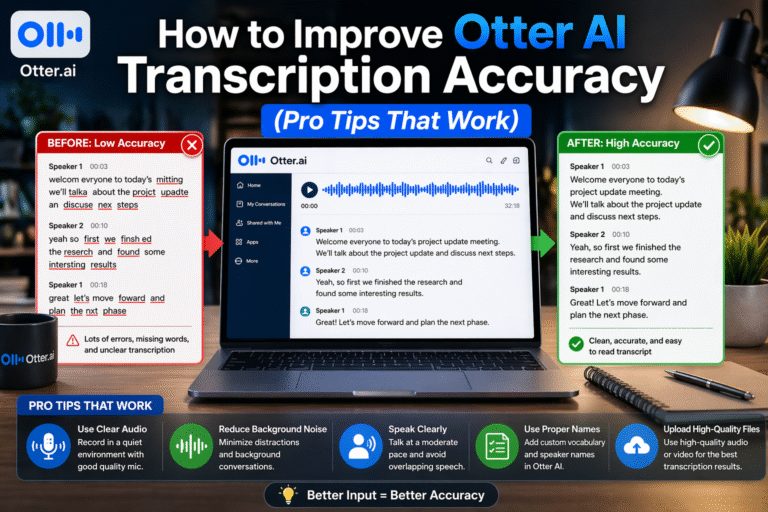
Improving audio quality is the most effective step. Using a good microphone and recording in a quiet environment makes a noticeable difference.
Speaking clearly and avoiding overlapping speech also helps. In meetings, encouraging participants to take turns can improve accuracy.
Adding custom vocabulary is another powerful tool. Including names, technical terms, and frequently used phrases helps Otter AI recognize them correctly.
Finally, reviewing transcripts is essential. Even a quick pass can catch most errors and improve overall quality.
For a detailed breakdown, see How to Improve Otter AI Transcription Accuracy (Pro Tips That Work).
Are These Errors a Dealbreaker?
Not really—but they do require awareness.
Otter AI is designed to save time, not replace human understanding completely. It excels at capturing the bulk of a conversation quickly, even if some details need correction.
For most use cases—meetings, lectures, interviews—it’s incredibly useful. But for high-stakes content like legal documents or published quotes, manual review is still necessary.
Final Thoughts: Understanding Errors to Use Otter AI Better
Otter AI transcription errors are not random—they follow clear patterns.
Once you understand what causes these errors and how they appear, you can work around them more effectively. Instead of being frustrated, you can anticipate issues and fix them quickly.
The key is to treat Otter AI as a first draft tool. It gets you most of the way there, and with a bit of refinement, it becomes a powerful part of your workflow.
FAQs: Otter AI Transcription Errors
Why does Otter AI get words wrong?
Because it predicts words based on audio patterns, not true understanding, which can lead to mistakes when speech is unclear or complex.
What are the most common Otter AI errors?
Misheard words, missing words, extra words, speaker confusion, and errors with accents or technical terms.
Can Otter AI handle accents accurately?
It can handle mild accents, but accuracy drops with strong or unfamiliar speech patterns.
How can I fix transcription errors quickly?
Focus on key sections like names, important statements, and technical terms during review.
Is Otter AI reliable despite these errors?
Yes, for most everyday use. However, manual review is still necessary for high-accuracy needs.