Otter AI Accuracy for Meetings: Can It Really Capture Every Word?
Meetings are where tools like Otter.ai are supposed to shine. Whether you’re in a Zoom call, a team briefing, or a client presentation, the promise is simple: record everything, transcribe it instantly, and never miss a detail.
But how well does that actually work in real business settings?
In this article, we’ll break down Otter AI’s accuracy in meetings, using real-world scenarios, practical insights, and data-backed expectations.
If you’re already exploring Otter, you may want to revisit Otter AI Transcription Accuracy Test: How Reliable Is It in 2026? for a broader overview, or Does Otter AI Work for Accents? Accuracy Test with Real Examples if your meetings involve diverse speakers.
You can also compare performance in Otter AI vs Human Transcription: Which Is More Accurate? or get the full picture in Otter AI Review.
Table of Contents
How Accurate Is Otter AI for Meetings?
In controlled conditions, Otter AI can achieve accuracy levels between 85% and 95% during meetings. This usually happens when the audio is clear, participants speak one at a time, and accents are minimal.
However, real meetings are rarely perfect. Once you introduce interruptions, overlapping speech, background noise, or different accents, accuracy tends to drop into the 75–90% range. This aligns with general industry findings that AI transcription tools perform best in structured environments but lose precision in dynamic conversations.
What this means in practice is that Otter AI will capture most of the conversation, but not necessarily everything correctly. Key ideas are usually preserved, but wording, names, and specific details may require correction.
Does Otter AI Capture Everything in Meetings?
The short answer is no—and expecting that can lead to frustration.
Otter AI is designed to capture the essence of conversations rather than produce a perfect, word-for-word transcript in real time. In meetings where people speak clearly and avoid talking over each other, it does a solid job of keeping up.
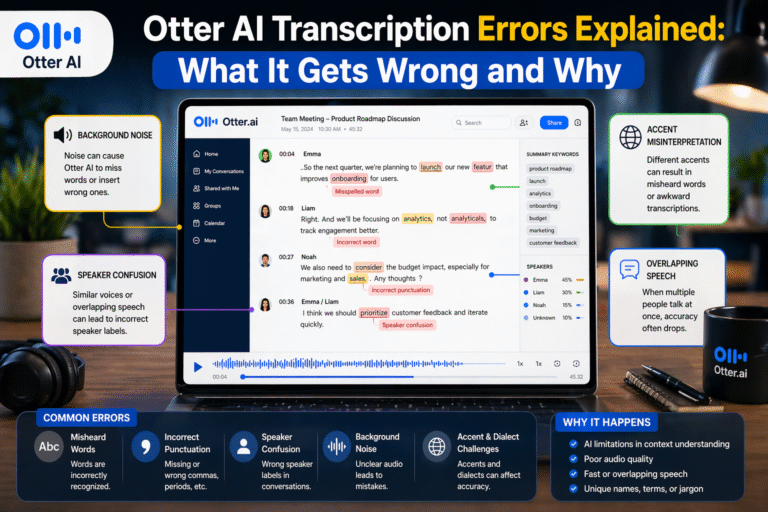
But in fast-paced discussions, especially brainstorming sessions or debates, some details can slip through. Words may be skipped, phrases may be merged, and speaker attribution can sometimes get mixed up.
From experience, Otter is excellent at capturing the overall flow of a meeting, including major points and decisions. However, it may struggle with finer details like:
- Technical terminology
- Proper names
- Action items phrased informally
That’s why it’s best used as a support tool rather than a final record.
How Does Otter AI Perform in Different Types of Meetings?
Not all meetings are the same, and Otter AI’s performance varies depending on the format and structure.
In formal business meetings, such as boardroom discussions or presentations, accuracy is usually higher. This is because speakers tend to talk more clearly and follow a structured agenda, making it easier for the AI to process speech.
In virtual meetings—especially on platforms like Zoom or Google Meet—Otter AI performs reasonably well when integrated directly. Clear audio input from digital sources often improves transcription quality compared to physical environments.
However, in informal team meetings or brainstorming sessions, accuracy can drop. These settings often involve interruptions, casual speech, and overlapping conversations, which are more challenging for AI to interpret.
Large meetings with multiple participants present another challenge. When several people speak in quick succession, Otter may struggle with speaker identification and maintaining context.
What Affects Otter AI Accuracy in Meetings?
Several factors influence how well Otter AI performs, and understanding them can help you get better results.
Audio quality is one of the biggest factors. Clear microphones and stable internet connections significantly improve transcription accuracy. Poor audio, on the other hand, introduces distortions that make it harder for the AI to recognize words correctly.
Speaker behavior also plays a major role. When participants speak clearly and avoid interrupting each other, Otter performs much better. Overlapping speech is one of the biggest causes of errors in meeting transcripts.
Accents are another important factor. As discussed in Does Otter AI Work for Accents? Accuracy Test with Real Examples, diverse accents can reduce accuracy, especially when combined with fast-paced conversation.
Background noise, such as typing, side conversations, or environmental sounds, can further reduce clarity. In busy office environments, this can have a noticeable impact on transcription quality.
Real-World Experience: Using Otter AI in Meetings
In real business use, Otter AI is incredibly helpful—but not flawless.
When used during structured meetings, such as client calls or presentations, it does a great job capturing the main discussion points. You can easily review what was said, search for keywords, and revisit important sections without replaying the entire recording.
However, during fast-paced team discussions, I’ve noticed that some sentences are incomplete or slightly inaccurate. For example, action points might need clarification, and speaker labels may not always be perfectly assigned.
One practical approach that works well is to treat Otter AI as a meeting assistant, not a replacement for human note-taking. It captures the bulk of the conversation, while you focus on refining key details afterward.
Can Otter AI Replace Manual Note-Taking in Meetings?
It can reduce the need for manual note-taking—but not eliminate it completely.
Otter AI allows you to stay engaged during meetings instead of writing everything down. This alone is a major productivity boost, especially in long or frequent meetings.
However, relying on it entirely without reviewing the transcript can lead to missed details. Important decisions, deadlines, or technical terms may need manual correction to ensure accuracy.
A hybrid approach works best. Let Otter handle the bulk of transcription, then quickly review and clean up the transcript after the meeting. This saves time while maintaining accuracy.
Tips to Improve Otter AI Accuracy in Meetings
If you want better results, a few simple adjustments can make a big difference.
Start by ensuring that everyone uses good-quality microphones. Clear audio input is the foundation of accurate transcription.
Encourage participants to speak one at a time. While this may not always be realistic, even small improvements in turn-taking can significantly boost accuracy.
Keeping meetings structured also helps. Agendas, clear transitions between topics, and moderated discussions make it easier for Otter to follow the conversation.
Adding custom vocabulary for frequently used names, projects, or technical terms can further improve recognition, especially in business settings where specific terminology is common.
Otter AI vs Human Transcription for Meetings
When it comes to meetings, the choice between AI and human transcription depends on your priorities.
Otter AI is fast, cost-effective, and convenient. It provides instant transcripts that are good enough for most internal purposes. For day-to-day meetings, it’s more than sufficient.
Human transcription, on the other hand, offers higher accuracy, especially for complex discussions involving multiple speakers, accents, or technical content. It’s better suited for situations where precision is critical, such as legal or official documentation.
As explored in Otter AI vs Human Transcription: Which Is More Accurate?, many professionals combine both approaches—using AI for speed and humans for refinement when needed.
Final Thoughts: Can Otter AI Capture Everything Correctly in Meetings?
Otter AI is a powerful tool for capturing meetings, but it doesn’t capture everything perfectly.
It excels at recording the overall flow of conversations and identifying key points, making it an excellent productivity tool for businesses and teams. However, it still requires human review to ensure accuracy, especially in complex or fast-paced discussions.
The key is to use it strategically. Treat it as a smart assistant that handles the heavy lifting, while you focus on refining and validating the final output.
FAQs: Otter AI Accuracy for Meetings
How accurate is Otter AI for business meetings?
Otter AI typically achieves 80–95% accuracy in meetings, depending on audio quality, speaker clarity, and meeting structure.
Can Otter AI handle multiple speakers in a meeting?
Yes, but accuracy may decrease when multiple people speak at the same time or in quick succession.
Does Otter AI work well for virtual meetings like Zoom?
Yes, especially when integrated directly with platforms like Zoom, where audio quality is usually clearer.
Can Otter AI replace meeting minutes?
It can significantly reduce the effort required, but manual review is still needed for important details and decisions.
Is Otter AI suitable for professional business use?
Yes, it’s widely used for internal meetings and note-taking, but for critical documentation, additional editing or human transcription is recommended.