Is Otter AI Good for Interviews? Accuracy Breakdown for Journalists
For journalists, interviews are everything. A single misquoted word can change the meaning of a story, damage credibility, or even create legal issues. So the big question is: can Otter.ai handle interviews accurately enough for real journalism work?
The short answer: yes—but with caution.
In this article, we’ll break down how Otter AI performs in interviews, using real-world data, journalist experiences, and practical insights. If you’re new to this topic, you may want to explore Does Otter AI Work for Accents? Accuracy Test with Real Examples, and Otter AI Accuracy for Meetings: Can It Capture Everything Correctly?.
Table of Contents
How Accurate Is Otter AI for Interviews?
Otter AI performs well under the right conditions, but interviews are rarely “ideal.”
In controlled environments—clear audio, one speaker—it can reach 95–99% accuracy. However, real-world interviews typically involve multiple speakers, varying tones, and spontaneous speech. In these cases, accuracy drops to around 80–90%, and even lower when conditions are challenging.
For journalists, this means Otter AI is reliable for capturing most of what’s said, but not precise enough to publish quotes without verification.
Does Otter AI Capture Quotes Accurately?
This is where things get serious.
Otter AI is good at capturing the general meaning of what someone says, but it can struggle with exact wording, especially in fast or emotional speech. Even small transcription errors can alter the meaning of a quote.
That’s why most journalists follow a strict rule:
Never publish AI-generated quotes without checking the original audio.
From real journalist discussions:
“For quotes, you need to triple check every word.”
In practice, Otter AI helps you find the quote quickly—but you still need to verify it before using it.
How Does Otter AI Perform in Different Interview Scenarios?
Not all interviews are the same, and Otter AI’s performance varies depending on the situation.
In one-on-one interviews with clear audio, Otter performs very well, often above 90% accuracy. These are the easiest scenarios for AI transcription, and you’ll likely only need minor edits.
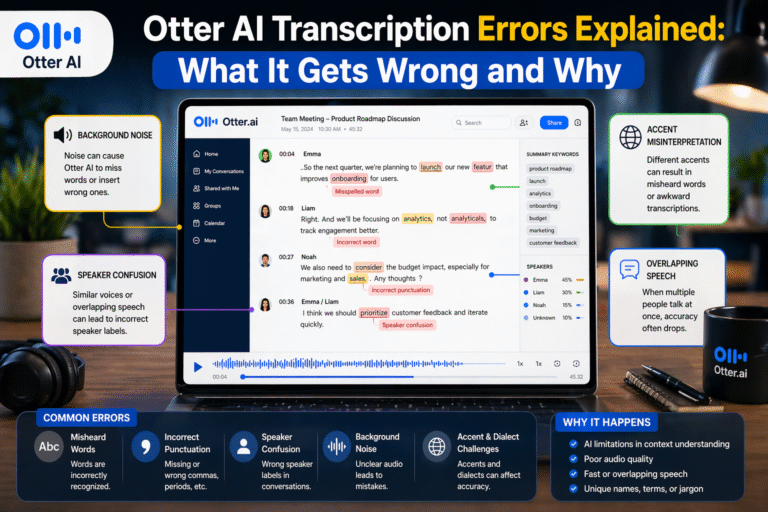
In recorded interviews with background noise—like cafés or outdoor settings—accuracy drops. While Otter can filter some noise, sudden sounds or overlapping speech can cause missed words or incorrect phrases.
In group interviews or panel discussions, accuracy declines further. Multiple speakers, interruptions, and varied speaking styles make it harder for the AI to keep track of who said what.
What Challenges Does Otter AI Face in Interviews?
Interviews are unpredictable, and that’s exactly what makes them difficult for AI.
One major challenge is natural speech patterns. Unlike structured meetings, interviews often include pauses, interruptions, slang, and emotional tone—all of which can confuse transcription systems.
Another issue is accents and pronunciation. As explained in Does Otter AI Work for Accents? Accuracy Test with Real Examples, accuracy can drop by 5–10% when dealing with non-native or strong regional accents.
Background noise is also a major factor. Street interviews, phone calls, or crowded environments can significantly reduce clarity, leading to more errors.
Finally, technical terminology and names are often misinterpreted. This is especially important for journalists covering specialized topics like tech, medicine, or politics.
Real Journalist Experiences Using Otter AI
Otter AI is already widely used in journalism, and the feedback is consistent: it saves time—but requires verification.
One journalist noted that Otter dramatically reduced transcription time, allowing them to process hours of interview footage quickly.
However, even positive reviews come with a caveat—accuracy is not perfect, especially with accents or complex speech.
From real-world discussions among journalists:
“Use transcription tools for a first pass… then check against the audio.”
Another user shared that AI transcription can cut workload by 60–70%, but still requires cleanup and careful review.
From experience, this matches reality. Otter AI is incredibly useful for navigating long interviews, finding key moments, and speeding up workflow—but it doesn’t replace careful listening.
Can Otter AI Replace Manual Transcription for Journalists?
Not completely—but it can significantly reduce the workload.
Manual transcription is slow and time-consuming, often taking hours for a single interview. Otter AI speeds up this process dramatically by generating a near-complete transcript in minutes.
However, because accuracy isn’t perfect, especially for quotes, journalists still need to review and edit transcripts before publishing.
The best approach is a hybrid workflow:
- Use Otter AI for the first draft
- Search and locate key quotes quickly
- Verify important sections against the audio
This approach balances speed with accuracy.
For a detailed note on this, read Otter AI versus Human Transcription to find out more.
Tips for Using Otter AI in Interviews (Journalist Workflow)
To get the best results, journalists need to use Otter AI strategically.
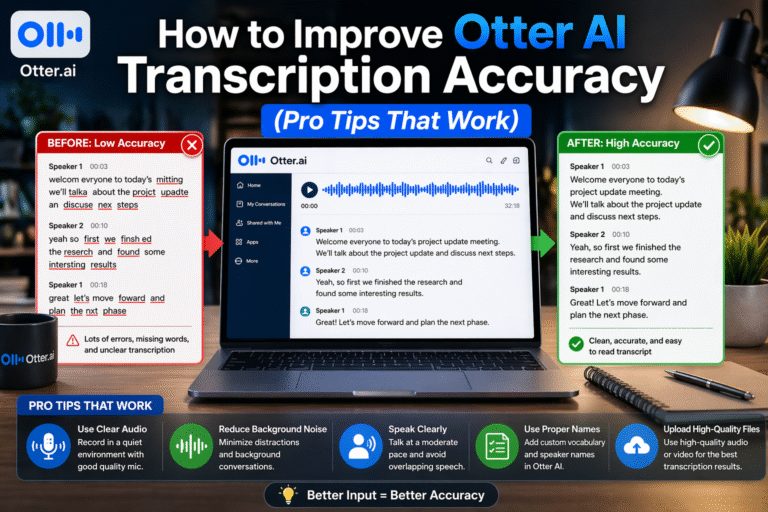
Recording high-quality audio is essential. A good microphone and quiet environment can significantly improve accuracy. Clear audio makes everything easier for the AI.
It’s also helpful to conduct interviews in a structured way when possible. Allowing speakers to finish their thoughts before interrupting improves transcription quality.
Using custom vocabulary for names, organizations, or technical terms can reduce errors, especially in specialized reporting.
Most importantly, always review the transcript before publishing. Even if the transcription looks correct, listening back to key sections ensures accuracy and protects your credibility.
Otter AI vs Human Transcription for Interviews
When it comes to interviews, human transcription still has an edge.
Humans can understand tone, context, and cultural nuances in ways that AI cannot fully replicate. This makes human transcription more reliable for precise quotes and complex discussions.
However, Otter AI offers speed and convenience that human transcription cannot match. That’s why many journalists combine both—using AI for speed and humans (or manual review) for accuracy.
As discussed in AI vs Human Transcription: Which Is More Accurate?, this hybrid approach is becoming the standard workflow.
Final Thoughts: Is Otter AI Good for Interviews?
Yes—Otter AI is a powerful tool for interviews, but it’s not perfect.
It works best as a time-saving assistant, helping journalists:
- Transcribe interviews quickly
- Search recordings efficiently
- Capture the overall conversation
However, it should not be used as a final source for quotes without verification.
Bottom line:
Otter AI is excellent for speed and productivity—but accuracy still requires human attention.
FAQs: Otter AI for Interviews
Is Otter AI accurate enough for journalism interviews?
It’s accurate enough for drafts (80–90%), but quotes should always be verified against the original audio.
Can Otter AI transcribe interviews with multiple speakers?
Yes, but accuracy may drop when speakers overlap or interrupt each other.
Does Otter AI work for recorded interviews?
Yes, and it performs better with high-quality recordings compared to noisy environments.
How much time does Otter AI save journalists?
It can reduce transcription workload by up to 60–70%, depending on the complexity of the interview.
Should journalists rely fully on Otter AI?
No. It’s best used as a first draft tool, with manual review required for accuracy and credibility.