
Video Express AI is an AI-powered video creation tool that converts text and images into professional-quality videos. It features text-to-video, AI voiceovers, image animation, face swap, and a built-in editor, making it ideal for YouTube, social media, ads, and business content.
Introduction: Why AI Video Creation Tools Matter Today
Video is everywhere now.
Scroll through social media, open a blog, check your inbox—video content dominates attention. And in 2026, the pressure to publish more videos, more frequently, is even higher.
Traditional editing still takes time. Learning complex software, trimming clips, syncing audio, resizing for different platforms—it adds up quickly. Not everyone wants to spend hours inside a timeline editor.
That’s why AI video creation tools like VideoExpress AI are gaining serious traction.
This review has been updated to reflect extended hands-on testing and practical implementation across multiple use cases, including:
- Cartoon story animations
- YouTube Shorts
- Faceless storytelling videos
- Consistent AI characters
- Baby dancing animation videos
- Full beginner walkthroughs
A complete YouTube walkthrough demonstrating cartoon animation creation has also been published and is embedded within this review.
This updated analysis covers:
- Core features and automation capabilities
- How it performs in real-world use
- Strengths and limitations observed during testing
- Practical tutorials you can follow
- Pricing breakdown
- And whether it’s still worth using in 2026
What Is Video Express AI?
Video Express AI is an AI-powered video creation platform designed to turn text prompts or images into short, visually engaging videos. Instead of manually editing clips, adding transitions, and adjusting timing, you simply describe what you want. The AI builds the video for you.
Think of it like explaining your idea to a smart assistant. You provide a prompt. The system selects visuals, applies motion, and assembles everything into a polished video.
No timeline editing.
No advanced tools.
No steep learning curve.
That’s the main appeal.
Who Video Express AI Is Designed For
Video Express AI isn’t aimed at professional video editors who enjoy detailed control. It’s built for people who want results fast.
That includes:
- Beginners who have never edited a video before
- Marketers creating ads, promos, or social posts
- Bloggers looking to repurpose written content into video
- Social media creators who need consistent short-form content
- Small businesses without a dedicated video team
If your goal is speed and simplicity, Video Express AI fits well.
It’s especially useful when video is part of your workflow, but not the main thing you want to spend hours on.
What Makes Video Express AI Different From Traditional Editors
Traditional editors give you control. Video Express AI gives you automation.
With tools like Adobe Premiere or even desktop editors like CapCut, you work inside a timeline. You choose every clip, transition, and effect manually. That’s powerful—but also time-consuming.
Video Express AI flips that process.
Instead of asking how to edit, it asks what you want to create. The AI decides the visuals, pacing, and structure based on your prompt. You step in only at the final stage if you want adjustments.
This approach removes friction. Especially for people who find traditional editing overwhelming.
Video Express AI Review: Core Features Explained
Now that you know what Video Express AI is, let’s look at what it actually offers. These core features are why the platform gets attention from creators who want quick, clean video output.
Text-to-Video Automation
This is the heart of Video Express AI.
You type in a prompt or short script. It could be a product description, a blog summary, or a simple idea like “motivational video about productivity.” The AI then converts that text into a complete video.
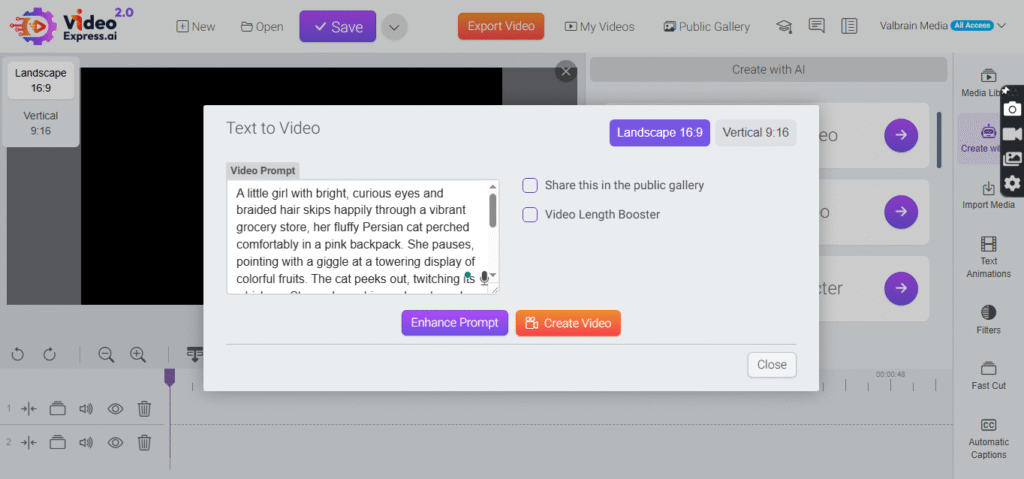
It automatically handles:
- Visual selection
- Scene timing
- Transitions
- Basic motion effects
You don’t need to choose clips manually. The system builds a sequence that matches your message.
For many users, this alone saves hours.
With this AI video creation tool, creators can produce videos faster — see the features in action.
Image to Video — Turn a Photo Into a Moving Video
This lets you take a static image and animate it into a video clip—adding motion, camera movement, and dynamic transitions so a still photo becomes engaging visual content. It’s useful for storytelling, product shots, or eye‑catching social posts without filming new footage.
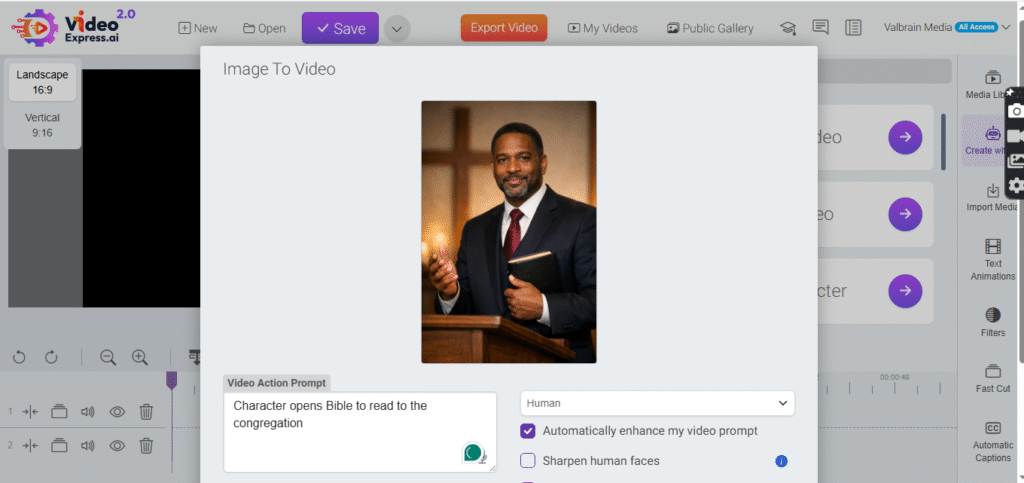
How to do it:
- Upload a still image — this can be a photo of a person, object, product, logo, or even a custom AI‑generated character.
- Add a script or text prompt — write the narrative or storyboard you want the video to follow.
- Generate — the AI will animate the image with motion, facial expressions (if it’s a person), and transitions.
Result: Instead of a static image, you get a short animated clip with natural movement and pacing — ideal for social videos or intros.
Stylized Character — Create Unique AI‑Driven Characters
Video Express AI can generate unique character visuals from prompts and images, shaping how a person or persona looks in a video. These stylized characters (cartoonish, professional, fantasy, etc.) help creators craft memorable branded or narrative content rather than relying solely on real footage.
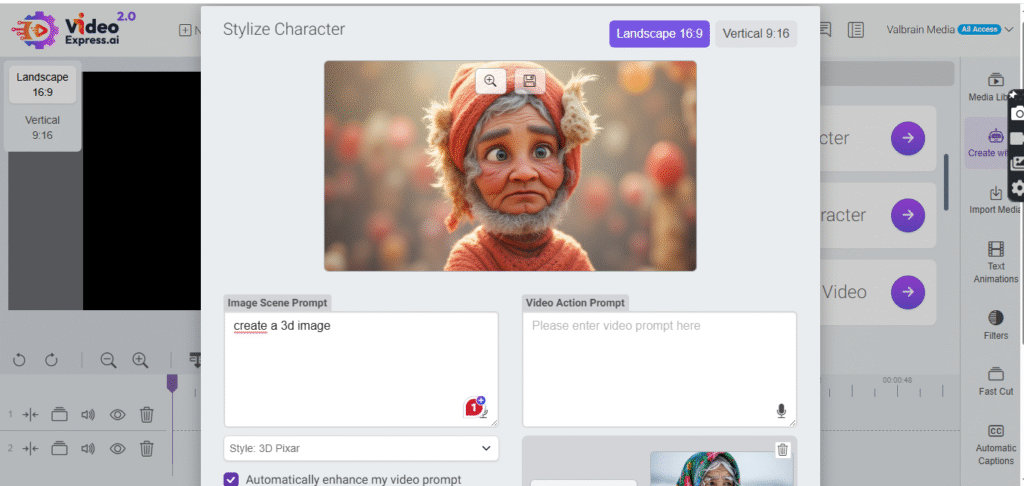
How to do it:
- Choose a prompt — describe the kind of character you want (e.g., “futuristic cartoon host with sunglasses”).
- Generate or upload base images — Video Express AI can generate or accept uploaded character designs.
- Apply stylization settings — select a style (cartoon, realistic, fantasy, etc.) before rendering.
Result: You get a visually distinctive character that can be animated, branded, and reused in multiple clips. This is great for branded hosts, mascots, or series content.
Consistent Character — Keep the Same Character Across Videos
Once you create an AI character, this feature ensures that the same character appearance is maintained across multiple videos and scenes. That’s great for ongoing series, brand mascots, or storytelling where you want visual continuity and identity recognition.
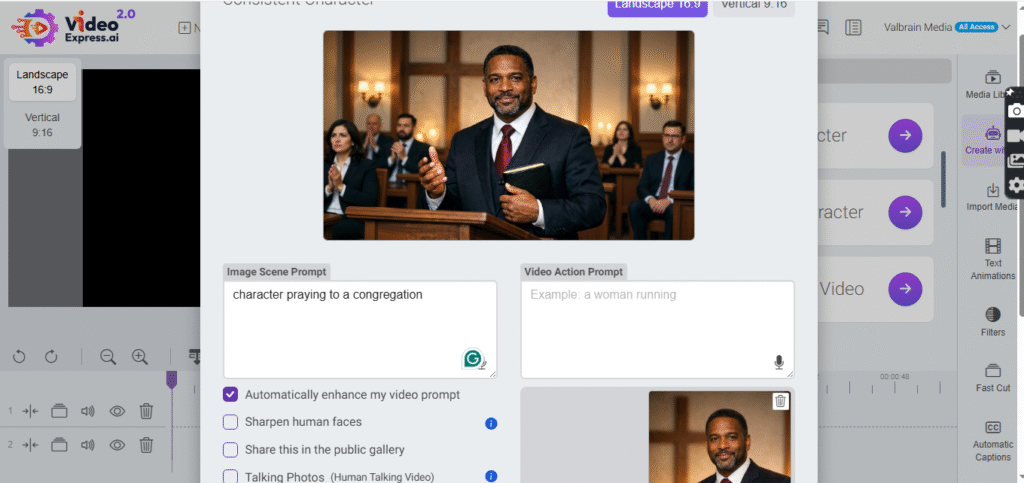
How to use it:
- Generate or upload a reference model — provide one or more images of your character so the AI learns the look and style.
- Save the character profile — many AI tools (and Video Express posts indicate this feature) allow you to keep the same character model for future projects.
- Use that saved model in new prompts — every time you generate a new video, select your saved character.
Result: Your character won’t change appearance dramatically from clip to clip — perfect for series, consistent brand personalities, or recurring characters.
AI Face Swap — Replace the Face in a Video
This feature lets you replace faces in videos or animations with another face (yours, a client’s, or any approved image) while keeping eye contact, expressions, and motion fluid. It’s often used for personalized videos, storytelling, or creative content where you want a specific person to appear in generated scenes.
How to use it:
- Upload a target video — pick the video where you want to replace the face or character.
- Upload the new face image — this can be your own photo or someone else’s (with consent).
- Run the swap — the AI inserts the new face into the video while keeping motion intact.
Result: You get a personalized AI video clip where the face in the original footage is replaced — useful for personalized messages, marketing, or creative edits without re‑shooting.
✅ Quick Tips for Best Results
- Use clear, high‑resolution images for characters and face swaps — this helps the AI keep features consistent.
- Add detailed scripts and prompts so the voices and animations match the story you want.
- Save character models to reuse them and build a consistent series of videos.
AI Voiceover Options
Not everyone wants to record their own voice. And not everyone has the right setup to do it well.
Video Express AI includes AI-generated voiceovers. You simply type your script, choose a voice, and the platform reads it aloud for you. The voice syncs with the visuals automatically.
You can select different tones and accents depending on your content. This is especially useful for explainer videos, ads, and educational content where clarity matters more than personality.
Stock Media, Templates, and Styles
Finding visuals is another time drain in video creation. Video Express AI solves this by offering built-in stock media and templates.
The AI pulls visuals that match your topic and applies them within pre-designed styles. This keeps videos looking clean and professional without requiring design skills.
Templates help maintain consistency too. If you’re creating content regularly, that matters.
Platform-Specific Video Exports
Posting the same video on different platforms usually means resizing and reformatting. Video Express AI handles that automatically.
You can export videos optimized for:
- TikTok
- YouTube
- Other social platforms
Aspect ratios, resolution, and formatting are adjusted for you. No manual tweaking needed.
Language and Accent Support
Video Express AI supports multiple languages and accents, making it useful for global content creators. You can tailor voiceovers and scripts for different audiences without creating separate projects from scratch.
For brands or creators working across regions, this feature adds real value.
How Text-to-Video Works in Video Express AI (Step-by-Step)
Text-to-video is where Video Express AI shines. The process is simple, even if you’ve never used an AI video tool before.
Here’s how it works.
Step 1 – Writing and Enhancing Your Prompt
You start by opening Video Express AI and selecting the option to create a video from a prompt.
At this stage, you can:
- Write a short description or topic idea
- Paste an existing script or blog excerpt
- Choose an aspect ratio (like 16:9 or 9:16)
- Select a visual style
There’s also an “Enhance Prompt” feature that helps turn short ideas into more detailed instructions for the AI. This is useful if you’re not sure how much detail to include.
The key thing here is focus. You think about the message. Not the editing.
Step 2 – AI Visual Generation and Scene Creation
Once your prompt is ready, the AI takes over.
You click generate, and the system creates visuals based on your text. It may first generate reference images, then assemble them into scenes with motion and transitions.
This happens quickly. No dragging clips. No timeline adjustments.
The AI decides how long each scene should last and how everything flows together. For most users, the result is surprisingly polished.
Step 3 – Previewing, Editing, and Exporting
After the video is generated, you get a preview.
This is where you can make small changes if needed. You might add:
- AI voiceovers
- Background music
- Platform-specific formatting
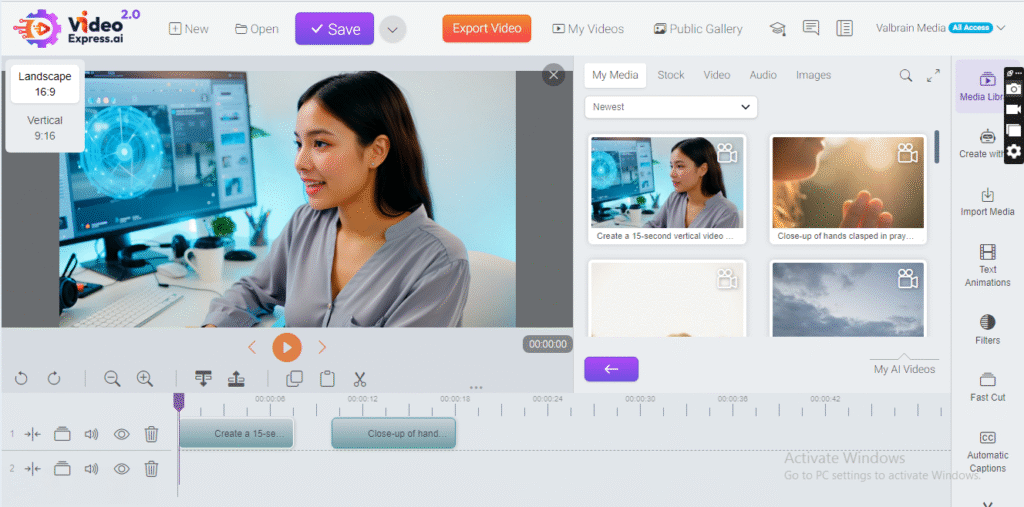
Once you’re satisfied, you export the video to your device.
That’s it. From idea to finished video in minutes.
If you’re looking for this AI-powered video software, you can view the full details here.
Why Video Express AI Appeals to Modern Creators
Video Express AI simplifies video creation in a way that suits today’s content demands. Beginners don’t feel overwhelmed. Marketers move faster. Bloggers repurpose content without extra tools.
After structured testing across animated storytelling, Shorts production, and character consistency workflows, VideoExpress AI proves most effective for creators who prioritize automation and speed over granular editing control.
It does not fully replace advanced editors such as CapCut, but it significantly reduces production friction for short-form, prompt-driven video creation.
Real-World Use Cases of Video Express AI
Video Express AI isn’t just a neat trick—it has practical applications for creators across industries. Let’s break down the most common ways people are using it.
The Video Express AI platform is built for YouTube and social media — explore what it offers.
Social Media Content Creation
Social media thrives on short, engaging video content. For platforms like Instagram, TikTok, and Facebook, content needs to be visually appealing and attention-grabbing within seconds.
Video Express AI makes this process fast. A marketer can type in a product idea or campaign message, and the AI generates a complete video in minutes. No need for filming, complicated editing, or resizing multiple times.
This is especially useful for small teams or solo creators who want to post consistently without burning out. The platform’s ready-made templates and platform-specific exports save a ton of time.
YouTube Videos and Shorts
YouTubers are increasingly repurposing scripts into short-form videos or channel intros. With Video Express AI, you can turn an idea into a short explainer video quickly.
Whether you want a 30-second highlight or a 2-minute tutorial, the AI handles scene timing, visuals, and voiceovers. Creators can focus on content strategy rather than spending hours in a timeline editor.
It’s not a replacement for full production if you want cinematic quality, but it’s perfect for fast uploads and consistent publishing.
Turning Blog Posts Into Videos
Old blog posts can gather dust, but they don’t have to. Video Express AI allows you to convert text content into video format.
This opens up new ways to reach audiences who prefer watching over reading. You can paste a blog excerpt, let the AI generate visuals and narration, and export a polished video. It’s a smart way to breathe life into existing content without extra effort.
Product Promotions and Ads
Small businesses and marketers love Video Express AI for creating promotional videos. A simple product description becomes a dynamic visual showcase.
You can add AI-generated voiceovers, background music, and motion effects to make ads more compelling. This is a cost-effective solution for businesses that don’t have the budget for professional video production teams.
Business Presentations and Explainers
Corporate teams are also finding value in Video Express AI. Presentations, internal explainer videos, and quick training clips can all be generated with minimal effort.
Instead of static slideshows, teams can produce clean, animated videos that make concepts easier to understand. The AI’s ability to generate visuals and narrations automatically simplifies the workflow.
Practical Implementation: Tutorials and Real-World Applications
Beyond feature exploration, VideoExpress AI has been tested across multiple structured tutorials to evaluate performance in real scenarios.
Below is a breakdown of applied use cases and published step-by-step guides:
Cartoon Story Video Creation with VideoExpress AI (With Full Video Walkthrough)
A complete tutorial demonstrates how to create animated cartoon storytelling videos using VideoExpress AI.
This includes:
- Character generation
- Scene sequencing
- Script-to-video conversion
- Voiceover integration
- Final export optimization
👉 You can checkout the full tutorial here: How to Create Cartoon Story Videos with VideoExpress AI (Beginner Step-by-Step Guide)
🎥 Alternatively, you can watch the YouTube tutorial here:
This example showcases the platform’s capability for narrative animation without manual timeline editing.
Consistent Character Development for Series Content
A structured guide demonstrates how to maintain character consistency across multiple videos.
👉 Full Tutorial here: How to Create a Consistent Character in VideoExpress AI 2.0
This feature is particularly valuable for:
- Ongoing animated series
- Brand mascots
- Recurring storytelling characters
Faceless Storytelling Workflows
VideoExpress AI has also been tested for faceless content formats.
👉 Full Tutorial here: How to Create Faceless Storytelling Videos Using VideoExpress AI
Ideal for:
- Motivation channels
- Educational storytelling
- Script-based content without on-camera presence
Single-Prompt Animated Video Creation
A simplified workflow demonstrates how detailed prompting can generate animated “baby dancing” videos using one structured instruction.
👉 Full Tutorial here: How to Create Baby Dancing Videos with VideoExpress AI Using a Single Prompt
This test highlights the automation strength of the platform.
YouTube Shorts Optimization
A complete guide explains how to generate vertical, short-form content suitable for YouTube Shorts.
👉 Complete Tutorial here: How to Create YouTube Shorts Using VideoExpress AI
This includes:
- 9:16 formatting
- Fast scene pacing
- Short-form script structure
VideoExpress AI Beginner Walkthrough Guides
For users starting from scratch:
👉 How to Use VideoExpress AI (Step-by-Step for Beginners)
👉 What Is Video Express AI and How Does It Work?
These guides support onboarding and structured learning.
Collectively, these tutorials provide a broader performance evaluation beyond theoretical feature descriptions.
Video Express AI Pricing Plans: Is One-Time Pricing Worth It?
Video Express AI offers one-time payment plans rather than monthly subscriptions.
Here’s what you need to know.
Basic Plan Review
- Price: $49 (one-time payment)
- Includes: Core features like text-to-video, image-to-video, inpainting, and timeline editor
- Limits: Up to 3,000 AI-generated video clips per month
The basic plan is ideal for casual creators who want to try the platform without committing to a recurring subscription. It provides access to essential features and removes watermarks.
All-Access Plan Review
- Price: $179 (one-time payment)
- Includes: Advanced tools like motion brush, talking/photos that sing, sound effects, video object removal, and faster rendering
- Limits: Approximately 6,000 AI clips per month
All-Access is designed for more serious creators who need premium features and higher AI clip limits. It unlocks the full potential of the platform for marketing, social media, and professional content creation.
Pricing Limitations and AI Clip Restrictions
While one-time pricing can feel attractive, there are downsides. The AI clip limits may feel restrictive for creators who post daily or need multiple videos.
Compared to subscription-based tools like CapCut desktop editor, which offers ongoing updates and more flexible free features, Video Express AI may feel limited over time.
In short: if you prioritize speed and simplicity, Video Express AI works well. If you want long-term flexibility, a tool like CapCut could be a better investment.
Video Express AI vs CapCut Desktop Editor
Many readers already know CapCut from previous reviews. It’s a powerful, desktop-based video editor with AI capabilities, and it serves as a strong alternative to Video Express AI.
If you’re curious about CapCut AI, one of the best free AI video editors, check out our full CapCut AI review here for all the details.
Feature-by-Feature Comparison Table
| Feature | Video Express AI | CapCut Desktop Video Editor |
|---|---|---|
| Ease of Use | Very simple, AI handles almost everything | Beginner-friendly but requires some learning |
| Text-to-Video Capabilities | Strong automation from prompt to video | Strong AI, but allows manual customization |
| AI Voiceovers | Multiple voices and accents | Multiple voices, more flexible tone control |
| Templates & Stock Media | Built-in templates & stock images | Larger media library & customizable templates |
| Editing Control | Limited manual editing | Full timeline and scene control |
| AI Avatars | Not available | Yes, personalized avatars for videos |
| Captions & Subtitles | Auto-generated but basic | Fully customizable captions and templates |
| Music & Sound Effects | Basic stock audio | Extensive music library and sound FX |
| Export Formats & Platform Optimization | Automatic formatting for multiple platforms | Wide export options, flexible settings |
| Pricing Model | One-time payment ($49–$179) | Free with optional paid upgrades |
| Best Suited For | Quick, automated videos | Creators who want flexibility and customization |
Automation vs Creative Control
Video Express AI excels in automation. It’s perfect if you want a video ready quickly with minimal input.
CapCut, however, gives you more control. You can tweak every scene, adjust timing, add music, and fine-tune visuals. For creators who want creative freedom, CapCut is more flexible.
AI Features Comparison
Both platforms offer AI-driven video creation and voiceovers. Video Express AI emphasizes speed and simplicity, while CapCut focuses on versatility, including avatars, script writing, and advanced audio options.
Ease of Use and Editing Flexibility
Video Express AI is easy for beginners. CapCut is also beginner-friendly but offers room to grow. If you want to experiment, expand your skills, and create polished, longer videos, CapCut is the stronger long-term choice.
The Best Video Express AI Alternative: CapCut Desktop Video Editor
Why CapCut Is a Strong Alternative
CapCut offers a free desktop editor that’s intuitive yet powerful. It’s ideal for creators who want AI tools but also want to control every part of the editing process.
Unlike Video Express AI’s one-time payment, CapCut updates regularly and provides free features that remain accessible over time.
If you’re looking for this AI-powered video software, you can view the full details here.
CapCut’s AI Video Generation Features
CapCut allows you to generate videos from text prompts, just like Video Express AI. It also offers:
- AI script writing to help plan content
- Customizable visuals and transitions
- Flexible timing and pacing control
- Scene-by-scene adjustments
This combination of speed and control makes it versatile for social media, YouTube, and business content.
AI Avatars, Voiceovers, and Music
CapCut takes it further by letting you:
- Add personalized avatars that speak your script
- Choose AI-generated voices with different accents and tones
- Add background music and sound effects that match the scene
This makes videos more engaging and professional without a big learning curve.
How to Create an AI Video Using CapCut (Step-by-Step Guide)
Creating your first AI video in CapCut is straightforward:
Step 1 – Open the AI Video Maker
Launch CapCut and select “AI Video Maker” from the main menu. Click “Instant AI Video” to start a new project.
Step 2 – Enter or Generate a Script
Type your script manually or use CapCut’s AI writer to generate one. Choose a visual style and aspect ratio for your platform. Select an AI voice if you want narration.
Step 3 – Customize Scenes and Media
Adjust or replace images in the “Scenes” tab. You can upload your own media or use CapCut’s built-in library.
Step 4 – Add Captions and Music
Select caption templates and background tracks to enhance engagement. Adjust volumes and timing as needed.
Step 5 – Export and Finalize
Once satisfied, click “Export.” Choose your resolution and format. Your video is ready to share across platforms.
Final Verdict: Should You Choose Video Express AI or CapCut?
- Video Express AI: Best for creators who prioritize speed, simplicity, and automated video creation. Perfect for quick social media posts, marketing clips, and repurposing content.
- CapCut Desktop Editor: Best for creators who want more creative control, flexibility, and free long-term use. Ideal for longer projects, advanced customization, and more polished videos.
Ultimately, your choice depends on your priorities: fast automation versus hands-on customization. Both tools serve different needs effectively.
Frequently Asked Questions About VideoExpress AI
Can beginners use Video Express AI easily?
Yes. The platform is designed for non-editors, with AI handling almost everything from visuals to voiceovers.
Is VideoExpress AI suitable for cartoon animation?
Yes. Structured testing shows it performs effectively for short cartoon storytelling when detailed prompts are used.
Can VideoExpress AI create YouTube Shorts?
Yes. The platform supports vertical formatting and short-form exports optimized for Shorts.
Does VideoExpress AI support consistent characters?
Yes. Character profiles can be reused across multiple videos for visual continuity.
Do I need to pay monthly for Video Express AI?
No. Video Express AI offers one-time payment plans. CapCut, however, is free with optional upgrades.
Can I create professional-quality videos with Video Express AI?
For short, automated content, yes. For highly polished, customizable videos, CapCut offers more control.
Does CapCut support AI avatars?
Yes. You can create avatars that speak your script, making videos more engaging.
Which tool is better for social media marketing?
Both work well. Use Video Express AI for quick automated posts and CapCut for more creative, custom content.