
Writing can be exhausting. Whether you’re a student polishing an essay, a blogger battling writer’s block, or a professional crafting reports, the struggle is real. Grammar mistakes slip through, sentences sound awkward, and paraphrasing content without plagiarizing feels impossible.
That’s where QuillBot promises to help.
QuillBot has exploded in popularity, with millions of users claiming it transforms their writing process. The AI-powered platform offers paraphrasing, grammar checking, summarizing, and more. But does it actually deliver, or is it just clever marketing?
I’ve spent quality time testing QuillBot extensively, using both the free and premium versions across different writing projects. I’ve paraphrased articles, checked grammar in blog posts, summarized research papers, and pushed every feature to its limits.
This review of QuillBot AI writing tool will walk you through everything: how each feature actually performs, whether the premium upgrade is worth it, how it compares to alternatives like Grammarly and ChatGPT, and most importantly, whether QuillBot truly lives up to the hype in 2025.
Let’s dive in and see what this tool can really do.
QuillBot AI Review: Quick Summary
Ease of Use: ⭐⭐⭐⭐⭐
Features: ⭐⭐⭐⭐☆
Pricing: ⭐⭐⭐⭐☆
Output Quality: ⭐⭐⭐⭐☆
Overall Rating: 4.3 / 5
Summary:
QuillBot AI continues to be one of the most reliable writing assistants available in 2025. It stands out for its simplicity, fast paraphrasing, and solid grammar correction features. The interface is user-friendly, and its integration with Google Docs and Chrome makes it convenient for daily use. While the free plan is limited and the AI sometimes struggles with complex sentence rephrasing, its overall performance, accuracy, and time-saving tools make it a top choice for students and writers looking to improve their writing efficiently.
What Is QuillBot AI?
QuillBot AI is an advanced writing assistant developed to help students, writers, and professionals enhance their writing with ease. Founded in 2017, QuillBot started as a simple paraphrasing tool and has since evolved into a full-fledged AI-powered writing suite used by millions of users worldwide. Its primary goal is to make writing clearer, faster, and more effective through automation and intelligent language processing.
Unlike grammar-focused tools like Grammarly, QuillBot specializes in rewriting and rephrasing content while maintaining original meaning. This makes it valuable for students avoiding plagiarism, content creators repurposing material, and professionals simplifying complex language.
The platform offers several core features: Paraphraser (rewrites text in different styles), Grammar Checker, Summarizer (condenses long content), Citation Generator, Plagiarism Checker (Premium only), Co-Writer (integrated writing space), and Translator.
QuillBot works through its website and browser extensions, integrating seamlessly with Google Docs and Microsoft Word. Throughout this review of QuillBot AI writing tool, I’ll show you exactly how each feature performs in real-world use.
Key Features of QuillBot
Paraphraser Tool – The Core Feature
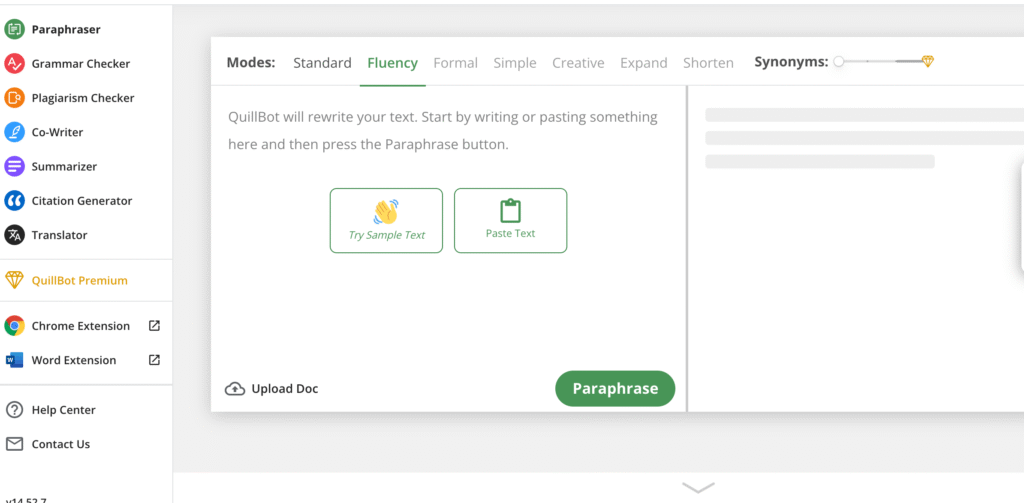
QuillBot’s Paraphraser is its flagship tool, offering seven different modes to rewrite text. Standard mode balances changes with clarity, Fluency prioritizes natural flow, Formal elevates tone for professional contexts, Creative produces more adventurous rewrites, Simple uses easier vocabulary, Shorten reduces word count, and Expand lengthens content.
My Test: I paraphrased this sentence: “Artificial intelligence is transforming how businesses operate and make decisions.”
- Standard: “AI is changing how companies function and decide.”
- Formal: “Artificial intelligence is fundamentally altering organizational operations and decision-making processes.”
- Creative: “The business landscape is being reshaped by AI’s influence on operations and choices.”
- Shorten: “AI transforms business operations and decisions.”
Result: The rewrites were contextually appropriate and natural-sounding, though Creative mode sometimes produced awkward phrasing.
Grammar Checker – Real-Time Corrections
The Grammar Checker scans text for spelling errors, punctuation mistakes, and syntax issues in real-time. It underlines errors and suggests corrections instantly as you type or paste content.
My Test: I intentionally wrote: “Their going to the store yesterday and buys some grocery.”
Result: QuillBot caught “Their” (should be “They’re”), “buys” (should be “bought”), and “grocery” (should be “groceries”). However, it missed some nuanced errors that Grammarly caught.
Summarizer – Condenses Long Content
The Summarizer condenses lengthy articles, research papers, or documents into key points. You can choose between paragraph mode (condensed paragraphs) or bullet points (key highlights). Adjust the summary length using a slider.
My Test: I summarized a 1,200-word article about climate change.
Result: QuillBot produced a coherent 150-word summary capturing main points accurately. However, it occasionally omitted important context and nuance from the original text.
Citation Generator – Academic Formatting
The Citation Generator creates properly formatted citations in APA, MLA, Chicago, and other academic styles. Enter source details like author, title, and publication date, and QuillBot formats it correctly.
My Test: I created citations for a book, journal article, and website.
Result: Citations were accurate and properly formatted. This feature saves significant time compared to manual formatting, though always double-check against official style guides.
Translator – Multilingual Support
The Translator converts text between languages including Spanish, French, German, Portuguese, Italian, Dutch, Japanese, Korean, Chinese, and more. You can translate then paraphrase in the target language.
My Test: I translated an English paragraph to Spanish, then paraphrased it.
Result: Translation quality was decent for common languages but occasionally produced unnatural phrasing. Better for understanding content than professional translation work.
My Experience Testing QuillBot AI
I tested QuillBot across blog articles, academic essays, social media posts, and email drafts to see how it performs in real-world scenarios for this review of QuillBot AI writing tool.
Performance: QuillBot delivered impressive speed, paraphrasing paragraphs in 2-3 seconds. The Standard and Fluency modes produced natural-sounding rewrites about 85% of the time. Grammar checking caught most basic errors, and the Shorten mode effectively reduced word count without losing meaning.
Limitations: The tool struggled with maintaining consistent tone across longer content. Creative mode often produced awkward phrasing requiring heavy editing. After multiple paraphrases, QuillBot recycled similar phrases and sentence structures. It frequently missed contextual meaning, replacing words with technically correct synonyms that changed intended emphasis. The tool lacks deeper understanding of argument flow, audience adaptation, and emotional nuance.
Overall, QuillBot excels at surface-level improvements but requires careful human review for quality writing.
QuillBot AI Pricing and Plans
| Plan | Paraphrasing Modes | Word Limit per Paraphrase | Summarizer Limit | Other Features | Price |
| Free Plan | 2 modes (Standard & Fluency) | 125 words | 1,200 words | Grammar checker, limited summarizer | Free |
| Premium Plan | 7 modes (Formal, Creative, Expand, Shorten, Simple, and more) | Unlimited | 6,000 words | Faster processing, advanced rewrites, tone options, and priority access | $19.95/month, $79.95/year |
* Prices might differ depending on your location
Verdict: Is QuillBot Worth It in 2025?
After extensive testing, the answer is yes for most writers.
The Strengths: QuillBot excels at paraphrasing, catches basic grammar errors quickly, and saves genuine time on repetitive writing tasks. It’s fast, affordable, and the free version offers surprising value.
The Weaknesses: It struggles with tone consistency, produces repetitive suggestions, and lacks deep contextual understanding. Grammar checking isn’t as comprehensive as Grammarly.
My verdict: This review of QuillBot AI writing tool confirms it remains one of the best options for students, content creators, and professionals seeking clearer, faster writing. It’s not perfect, but it’s reliable and genuinely useful.
Rating: 4.3/5
Final recommendation: If you write often, QuillBot is worth trying. It’s reliable, affordable, and genuinely saves time. Start with the free plan today
Conclusion
This review of QuillBot AI writing tool confirms it’s a valuable writing assistant for 2025. While not perfect, its paraphrasing capabilities, affordability, and time-saving features make it essential for students, bloggers, and professionals who write regularly.
FAQs – Review of QuillBot AI Writing Tool
What does QuillBot Premium include?
The Premium plan unlocks seven paraphrasing modes, faster processing, unlimited paraphrasing, a higher summarizer limit, and tone adjustments. It also integrates better with Google Docs and Chrome for smoother workflow.
Can QuillBot replace Grammarly or Wordtune?
Not entirely. While QuillBot excels in paraphrasing and summarizing, Grammarly focuses more on grammar accuracy and tone detection. Wordtune, on the other hand, offers real-time rewrite suggestions. Many users find the best results by combining QuillBot with one of these tools.
Is QuillBot AI safe to use?
Yes, QuillBot is secure and does not store your text permanently. Your content remains private and protected, which makes it suitable for both academic and professional writing.
Does QuillBot detect plagiarism?
Yes, QuillBot offers a plagiarism checker as part of its Premium plan. It scans your content across millions of sources to ensure originality, which is especially useful for students and content creators.