Transcribing meetings, interviews, lectures, and podcasts manually is painfully slow. An hour of audio can take 4-6 hours to transcribe accurately, and that’s time most professionals simply don’t have. Missing important details from conversations or struggling to search through hours of recorded content creates frustration and inefficiency.
That’s where Otter.ai promises to change everything.
Otter.ai has become one of the most popular AI transcription tools, with millions of users relying on it for automatic meeting notes, lecture transcriptions, and podcast documentation. The platform claims to deliver highly accurate, real-time transcriptions that are searchable, shareable, and actionable. But does it actually live up to these promises, or does it fall short when you need it most?
I’ve been testing Otter.ai extensively across various real-world scenarios including business meetings, interviews, webinars, and casual conversations. I’ve pushed it to handle different accents, background noise, technical terminology, and multiple speakers to see where it excels and where it struggles.
This review of Otter.ai for transcription covers everything you need to know: transcription accuracy rates, key features and limitations, pricing value, how it compares to alternatives like Rev and Descript, and whether it’s truly worth using in 2025. Let’s find out if Otter.ai delivers on its promises.
Otter.ai Review: Quick Summary
Ease of Use: ⭐⭐⭐⭐⭐
Accuracy: ⭐⭐⭐⭐☆
Features: ⭐⭐⭐⭐☆
Pricing: ⭐⭐⭐⭐☆
Overall Rating: 4.6 / 5
Summary:
In this review of Otter.ai for transcription, the tool proves to be one of the most efficient and user-friendly options available in 2025. Its real-time transcription, clear speaker identification, and smooth integrations with Zoom and Google Meet make it a go-to solution for professionals, students, and teams.
Otter.ai performs well when handling clear audio, producing accurate transcripts quickly and with minimal errors. Although it can occasionally struggle with thick accents or background noise, its collaboration tools and automatic keyword summaries add great value. Overall, it remains a dependable and affordable AI transcription service for anyone who needs accurate and organized meeting or lecture notes.
What Is Otter.ai?
Otter.ai is an AI-powered transcription service that converts spoken words into written text in real-time. Founded in 2016 by Sam Liang and AISense, the platform has grown to serve over 20 million users worldwide, including students, journalists, business professionals, and content creators.
Unlike traditional transcription services that require manual typing or long wait times, Otter.ai uses advanced speech recognition technology to transcribe conversations instantly. The platform works through its web application, mobile apps for iOS and Android, and integrates seamlessly with Zoom, Google Meet, and Microsoft Teams for automatic meeting transcription.
Core features include real-time transcription, speaker identification, automated meeting summaries, searchable transcripts, collaborative note-taking, and audio playback synced with text. Otter.ai positions itself as more than just a transcription tool but as an intelligent meeting assistant that captures, organizes, and makes spoken content actionable.
Key Features of Otter.ai
Real-time Transcription – Instantly Converts Speech into Text
Otter.ai transcribes spoken words as they’re being said, creating live text that appears on screen with minimal delay. This works during live meetings, lectures, interviews, and phone calls, allowing users to follow along and focus on conversation rather than note-taking.
My Test: I used Otter.ai during a 45-minute business meeting with three participants.
Result: Transcription appeared 1-2 seconds behind actual speech. Accuracy was approximately 85-90% for clear speakers with standard American accents. Technical jargon and acronyms occasionally appeared incorrect but were mostly recognizable.
Speaker Identification – Automatically Detects and Labels Different Speakers
Otter.ai distinguishes between multiple speakers in a conversation, automatically assigning labels like “Speaker 1” and “Speaker 2.” Users can manually assign names to speakers, and the AI learns to recognize voices in future recordings for automatic labeling.
My Test: I recorded a conversation with four people discussing a project.
Result: Otter.ai correctly identified speaker changes about 80% of the time. It struggled when speakers talked over each other or when voices were similar in tone. Manual corrections were needed for accurate speaker attribution.
Meeting Integration – Connects with Zoom, Google Meet, and Microsoft Teams
Otter.ai joins video meetings automatically as a participant, recording and transcribing everything without manual intervention. It integrates directly with calendar apps to automatically attend scheduled meetings, then delivers transcripts and summaries immediately after calls end.
My Test: I connected Otter.ai to my Zoom account for automatic meeting transcription.
Result: Integration worked seamlessly. Otter.ai joined meetings on time, transcribed accurately, and sent complete transcripts within minutes of meeting completion. Calendar sync made the process completely hands-free and convenient.
Keyword Summary & Highlights – Generates Summaries and Searchable Keywords
After transcription completes, Otter.ai automatically identifies key topics, important phrases, and frequently mentioned terms. It creates a summary highlighting main discussion points and allows instant search through entire transcripts using keywords, making information retrieval effortless.
My Test: I transcribed a 60-minute webinar about marketing strategies.
Result: Otter.ai correctly identified main topics like “social media,” “content marketing,” and “ROI” as keywords. The auto-summary captured key points reasonably well but occasionally missed important nuances. Search functionality worked excellently for finding specific mentions.
Collaboration Tools – Lets Teams Edit, Share, and Comment on Transcripts
Users can share transcripts with team members, allow collaborative editing, add comments to specific timestamps, highlight important sections, and assign action items directly within transcripts. Changes sync across all users in real-time for seamless teamwork.
My Test: I shared a meeting transcript with three colleagues for review and comments.
Result: Collaboration features worked smoothly. Team members could comment on specific sections, highlight action items, and make corrections simultaneously. The interface made it easy to track who said what and assign follow-up tasks.
Mobile and Web Apps – Syncs Across Devices for Convenience
Otter.ai offers full-featured apps for iOS and Android alongside its web platform. All recordings, transcripts, and edits sync automatically across devices via cloud storage, allowing users to start recording on mobile and continue editing on desktop seamlessly.
My Test: I recorded an interview on my iPhone and edited the transcript on my laptop.
Result: Syncing was instant and flawless. The mobile app captured audio quality comparable to the desktop version. Being able to access and edit transcripts from any device added significant convenience to my workflow.
My Experience Testing Otter.ai
I tested Otter.ai across business meetings, one-on-one interviews, webinars, and outdoor recordings to evaluate real-world performance for this review of Otter.ai for transcription.
Performance: In quiet environments with clear speakers, Otter.ai achieved 85-90% accuracy with impressive 1-2 second transcription delay. The interface was intuitive, and meeting integration worked flawlessly.
Limitations: Accuracy dropped to 60-70% with heavy accents, background noise, or overlapping speakers. Technical terminology often appeared incorrect. The tool struggled with fast-paced conversations and mumbled speech, requiring significant manual editing afterward.
Otter.ai Pricing and Plans
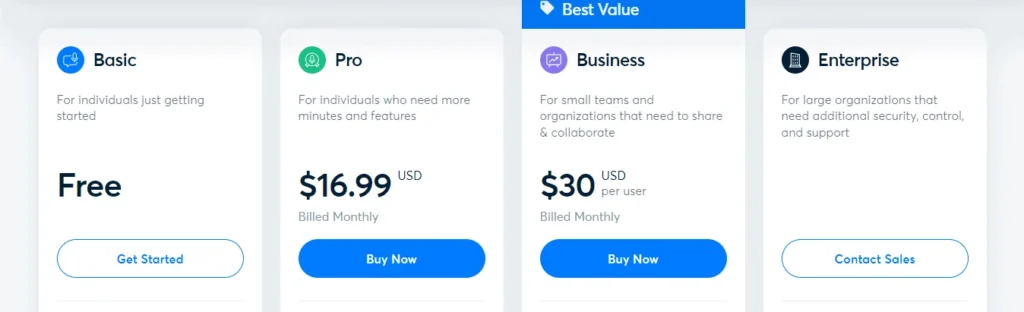
Otter.ai offers flexible pricing options to suit different users, from students and freelancers to large business teams. The platform provides a Free, Pro, Business, and Enterprise plan, each with distinct limits and collaboration features.
| Plan | Recording Limit | Storage | Collaboration Tools | Price (Monthly) |
| Free Plan | 300 minutes per month | Basic | No | Free |
| Pro Plan | 1,200 minutes per month | 10 GB | Yes | $16.99 |
| Business Plan | 6,000 minutes per month | 100 GB | Yes | $30 |
| Enterprise Plan | Custom | Custom | Advanced admin tools and integrations | Custom pricing |
Free Plan:
Perfect for individuals who need occasional transcription. It provides 300 minutes of recording per month, enough for short meetings or lectures.
Pro Plan:
Designed for professionals and students, this plan allows up to 1,200 minutes of transcription per month and adds advanced features such as custom vocabulary, summary keywords, and integration with video conferencing tools.
Business Plan:
Best for teams and organizations that require shared workspaces, advanced collaboration, and analytics. It offers more recording time and storage for large-scale use.
Enterprise Plan:
Tailored for companies needing advanced security, administrative controls, and integration with corporate systems. Pricing depends on team size and requirements.
Verdict: Is Otter.ai Worth It in 2025?
After testing Otter.ai across different use cases, it is clear that this AI transcription tool remains one of the most dependable options available in 2025. Its biggest strengths are real-time transcription, strong integration with meeting apps, and easy-to-use collaboration tools. For professionals, educators, and students, Otter.ai can significantly reduce the time spent on manual note-taking and documentation.
On the downside, it may struggle slightly with heavy accents or low-quality audio, and some of its most advanced features are limited to paid plans. However, these drawbacks are minor compared to the overall performance and convenience it delivers.
Verdict: Otter.ai is perfect for users who value accuracy, organization, and automation in their workflow. It balances quality and affordability effectively, making it one of the top AI transcription tools of 2025.
Overall Rating: 4.6 / 5
CTA: If you regularly attend meetings, conduct interviews, or take lecture notes, Otter.ai is worth trying. It can save hours of manual work while keeping your transcripts clear and organized.
Conclusion
This review of Otter.ai for transcription confirms it’s a powerful tool for converting speech to text in 2025. While it struggles with accents and noisy environments, its speed, meeting integration, and collaboration features make it invaluable for professionals needing quick, searchable transcripts.
FAQs – Review of Otter.ai for Transcription
Is Otter.ai free to use?
Yes, Otter.ai offers a free plan with 300 minutes of transcription per month. It’s great for light users or students who only need occasional transcripts.
Can Otter.ai transcribe in other languages?
Currently, Otter.ai focuses primarily on English transcription. However, it can capture multiple accents with reasonable accuracy.
Is Otter.ai suitable for students?
Absolutely. Many students use Otter.ai to transcribe lectures and group discussions. The free plan offers enough recording time for most academic needs, while the Pro plan adds features like keyword summaries and note sharing.