Here’s a quick question: Have you ever judged a book by its cover?
Of course you have. We all do.
Whether you’re publishing on Amazon KDP, selling an ebook on your website, or creating a lead magnet for your audience, your book cover design can either pull readers in—or make them scroll past without a second thought.
The good news? You don’t need Photoshop. You don’t need to hire a $300 designer. And you definitely don’t need to spend weeks figuring out complicated tools.
In this guide, we’ll walk you through how to create book covers in Artistly AI, step by step. We’ll also briefly compare it to tools like Midjourney and Canva so you can see why many authors prefer Artistly for publishing.
If you want a full breakdown of the platform’s features and pricing, make sure you check out our detailed Artistly AI Review.
Table of Contents
What Is Artistly AI Book Cover Generator?
Artistly AI is an AI-powered design tool that allows you to create professional visuals using simple text prompts. Instead of dragging elements around manually, you simply describe what you want—and the AI generates complete designs for you.
The Book Cover feature inside Artistly is specifically built for authors, publishers, marketers, and content creators. You enter your title, subtitle, and a short description of your book’s vibe. Within seconds, you get multiple ready-to-use cover concepts.
It’s fast. It’s beginner-friendly. And it’s built with commercial rights included.
Why Your Book Cover Matters More Than You Think
Here’s the reality: your book cover is not just decoration. It’s marketing.
On platforms like Amazon, readers see your book as a tiny thumbnail. If your title isn’t readable or your design doesn’t match your genre, you lose clicks. And fewer clicks mean fewer sales.
A strong cover does three things:
- It signals your genre instantly.
- It looks professional.
- It makes people curious enough to click.
That’s exactly where AI book cover tools like Artistly come in.
Step-by-Step: How to Create Book Covers in Artistly AI
Let’s break this down in the simplest way possible.
Step 1: Enter Your Book Information
Once you log into Artistly AI, go to the Book Covers section. You’ll see fields where you can enter:
- Your book title
- Subtitle
- Author name (optional)
- A short visual prompt (Theme)
This visual prompt is where the magic happens. You don’t need to write a long paragraph. Just describe the mood and imagery you want.
For example, if you’re writing fantasy, you could type:
“Dark forest, glowing sword, dragon silhouette, cinematic lighting.”
If it’s a children’s book, you might write:
“Cute watercolor fox reading under a tree, playful, bright colors.”
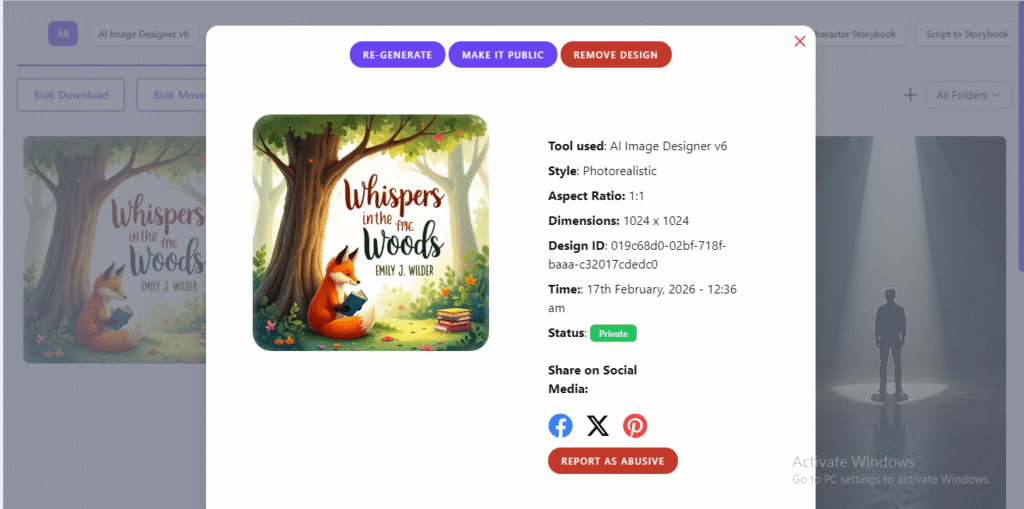
The more specific you are about the mood, the better the result.
Step 2: Choose a Genre or Style
Artistly allows you to choose genre-based styles like thriller, romance, sci-fi, fantasy, kids, business, and minimalist.
This is important because different genres have different visual expectations. Romance covers don’t look like thrillers. Business books don’t look like children’s stories.
By selecting a genre, you’re helping the AI design something that matches what readers already expect in that category.
Step 3: Generate Your Book Covers
Now comes the fun part.
Click “Generate.”
Within seconds, Artistly produces multiple professionally styled book covers. These aren’t just random images. They come with:
- Structured layouts
- Styled backgrounds
- Properly aligned typography
- Balanced design elements
You’re not starting from a blank page. You’re reviewing ready-made concepts.
Step 4: Customize and Refine
Don’t love the first result? No problem.
You can tweak the fonts, adjust colors, reposition text, or refine your prompt and regenerate. Many authors create 5 to 10 versions before choosing their final design.
That flexibility is powerful because you’re not paying per revision like you would with a freelancer.
Step 5: Download and Publish
Once you’re happy with your design, you can export it in high resolution.
Artistly AI allows commercial use, which means you can legally publish and sell your book anywhere—Amazon KDP, print-on-demand platforms, your own website, or even digital course marketplaces.
And yes, the files are ready for publishing standards.
Artistly AI vs Midjourney vs Canva
Let’s quickly talk about alternatives.
Artistly AI
Artistly is built specifically for creators who want finished designs. It handles both the artwork and the typography layout. You don’t need additional tools.
It’s fast, beginner-friendly, and comes with a one-time payment option.
Midjourney
Midjourney is incredibly powerful for generating AI art. But here’s the catch—it only creates images. You still need to use another tool to add your title and format the cover correctly.
So while Midjourney is great for illustrations, it’s not optimized for complete book cover creation out of the box.
Canva
Canva is template-based. It works well, but you’re manually designing everything. It can take hours to get a polished look if you’re not design-savvy.
Artistly sits in the sweet spot—it combines AI creativity with structured layout design specifically for publishing.
Artistly AI vs other Book Cover Tools — Feature Comparison
| Feature | Artistly AI | Midjourney | Canva |
|---|---|---|---|
| AI-based Cover Generation | ✅ Built-in | ⚠️ Only art generation | ❌ Manual |
| Integrated Typography Layout | ✅ Yes | ❌ No | ✅ Yes |
| Genre-Specific Presets | ✅ Yes | ❌ No | ⚠️ Limited |
| Time to First Draft | ⏱️ ~1 min | ⏱️ ~1 min (art only) | ⌛ ~30–60+ min |
| Design Skill Needed | ❌ None | ⚠️ Some prompt skill | ⚠️ Some design skill |
| High-Res Download | ✅ Yes | ⚠️ With external tools | ✅ Yes |
| Commercial Usage Rights | ✅ Yes | ⚠️ Depends on license | ✅ Yes |
| Best For | Full cover design | Illustrations only | Template design |
Who Should Use Artistly AI for Book Covers?
If you’re a self-published author, this tool can save you hundreds of dollars per book.
If you create children’s books, you can experiment with bright, character-focused designs quickly.
If you’re a coach or entrepreneur, you can design ebook covers for lead magnets and digital downloads without hiring a designer.
Even if you’re a complete beginner, you can produce covers that look agency-level.
Practical Tips for Better AI Book Cover Results
Let me share a few practical tips that make a big difference.
Keep your prompt concise but descriptive. Five to ten strong keywords work better than a long, vague sentence.
Mention style words like “vintage,” “dark,” “minimalist,” or “whimsical.” These guide the AI clearly.
Always preview your cover at small thumbnail size. If the title isn’t readable when small, adjust the contrast or font weight.
And don’t settle for the first result. Generate variations. AI makes testing easy.
Artistly AI Pricing Overview
Artistly AI offers one-time payment plans, which many users prefer over monthly subscriptions.
The Commercial plan gives you access to the book cover feature.
The Premium plan unlocks more advanced styles and full platform access.
Both include unlimited usage, high-resolution exports, and commercial rights.
Pricing Comparison for Artistly AI Plans
| Plan | Price (One-Time) | AI Book Covers Included | Unlimited Usage | High-Res Exports | Commercial License |
|---|---|---|---|---|---|
| Commercial | $49 | ✅ Yes | ✅ Yes | ✅ Yes | ✅ Yes |
| Premium | $147 | ✅ Yes + Advanced Styles | ✅ Yes | ✅ Yes | ✅ Yes |
Notes:
- Both plans include the core AI Book Cover Generator.
- Premium unlocks more styles and creative flexibility.
👉 All plans come with a 30-day money-back guarantee.
If you want the full feature comparison and breakdown, check the detailed [Artistly AI Review] (Insert Internal Link Here).
Ready to Create Your Book Cover?
If you’re serious about publishing faster and saving money on design, this is worth trying.
Final Thoughts
Here’s the simple truth.
Your book deserves a cover that looks professional. But you don’t need expensive software or a design degree to get there.
With Artistly AI, you go from prompt to polished cover in minutes. You control the creative direction. You generate multiple concepts. And you publish with confidence.
If you’re an indie author, digital creator, or entrepreneur building digital products, this tool can streamline your workflow significantly.
So instead of overthinking design… let AI handle the heavy lifting.
And focus on what you do best—writing.
Frequently Asked Questions
1. Can I really create a professional book cover with Artistly AI?
Yes, you can. Artistly AI generates fully designed book covers using simple text prompts. It combines background imagery, typography, and layout structure automatically, so you don’t need graphic design experience to create a professional-looking cover.
2. Is Artistly AI book cover generator suitable for Amazon KDP?
Yes. Artistly AI allows you to export high-resolution files that are suitable for platforms like Amazon Kindle Direct Publishing (KDP), print-on-demand services, and digital ebook platforms. Always double-check size requirements before uploading.
3. Do I need design skills to use Artistly AI?
No design skills are required. You simply enter your book title, subtitle, and a short description of the style you want. The AI handles the layout, fonts, and visual balance for you.
4. How is Artistly AI different from Midjourney for book covers?
Midjourney mainly generates artwork images. You would still need another tool to add titles and properly format the cover. Artistly AI, on the other hand, creates both the artwork and the structured typography layout in one place, making it more beginner-friendly for authors.
5. Can I use the book covers commercially?
Yes. Artistly AI includes commercial usage rights, which means you can legally sell your book covers on Amazon, your website, or other marketplaces. Always review the latest licensing terms inside the platform for confirmation.