Artificial intelligence is transforming the world of video creation in remarkable ways. Tasks that once required hours of careful editing, technical expertise, and powerful hardware can now be completed in minutes with smart, automated tools. From generating captions and detecting scenes to enhancing video quality and producing full videos from text prompts, AI has become a central part of modern content production.
There is a growing demand for faster, automated, and more efficient video editing. Brands are producing more social media content, influencers must maintain consistent posting schedules across multiple platforms, and YouTubers are competing for visibility in a highly saturated space. Businesses also rely heavily on video for marketing, training, and customer engagement. As a result, creators and editors need tools that help them work smarter, not harder — and AI provides exactly that advantage.
This article highlights the best AI tools for video creators and editors, focusing on their features, strengths, and ideal users. It also explains why AI has become essential in today’s content landscape and offers a practical checklist for choosing the right AI video editing tool. Whether you’re a beginner, professional editor, short-form creator, or brand strategist, this guide will help you select the tools that fit your workflow and creative goals.
Why AI Tools Are Essential for Video Creators
Faster Editing and Automated Workflow
AI dramatically shortens the time spent on repetitive tasks. Cutting silences, removing filler words, syncing audio, generating subtitles, stabilizing footage, or selecting the best clips can all be automated. Tools like Descript, Runway ML, and CapCut streamline editing workflows so creators can focus on storytelling instead of manual adjustments. Faster editing means more consistent output — a key advantage in the content economy.
Improved Video Quality Through AI Enhancements
AI-driven enhancement tools can automatically fix lighting, improve color grading, reduce noise, sharpen faces, and upscale resolution. This allows creators to produce high-quality visuals without advanced equipment. Even shaky or low-quality footage can be rescued using techniques like AI stabilization, denoising, and detail enhancement. The result is professional-quality video produced with far less effort.
Cost Savings for Freelancers, YouTubers, and Agencies
AI tools help creators save money by reducing the need for large editing teams or multiple software subscriptions. Cloud-based editors allow users to work from any device, eliminating the need for expensive laptops and GPUs. Many tools offer affordable plans with features rivaling traditional professional editing software. For freelancers and small agencies, this translates into lower production costs and higher profit margins.
Accessibility for Beginners With No Editing Skills
AI makes video editing accessible to everyone. People who have never used editing software can now create polished videos using templates, text-driven editing, auto-generated clips, and AI voiceovers. Drag-and-drop timelines, smart recommendations, and automatic adjustments remove the complexity that once intimidated new creators. This accessibility opens the door for more people to join the digital creator economy.
Support for Short-Form Platforms (TikTok, Reels, YouTube Shorts)
Short-form content dominates social media, and AI tools provide creators with everything needed to keep up. Automated captions, trendy templates, dynamic effects, and auto-framing help produce attention-grabbing videos quickly. Some tools even analyze clips and suggest the best format or style for a specific platform. This level of support makes it easy for creators to stay consistent and relevant.
What to Look for in an AI Video Editing Tool (Checklist)
Ease of Use & Automation Level
A good AI tool should simplify editing, not complicate it. Look for intuitive interfaces, clear navigation, drag-and-drop features, and smart automation. Tools that offer text-based editing, auto cropping, or scene detection make workflows smoother and allow creators to focus on creativity instead of technical steps.
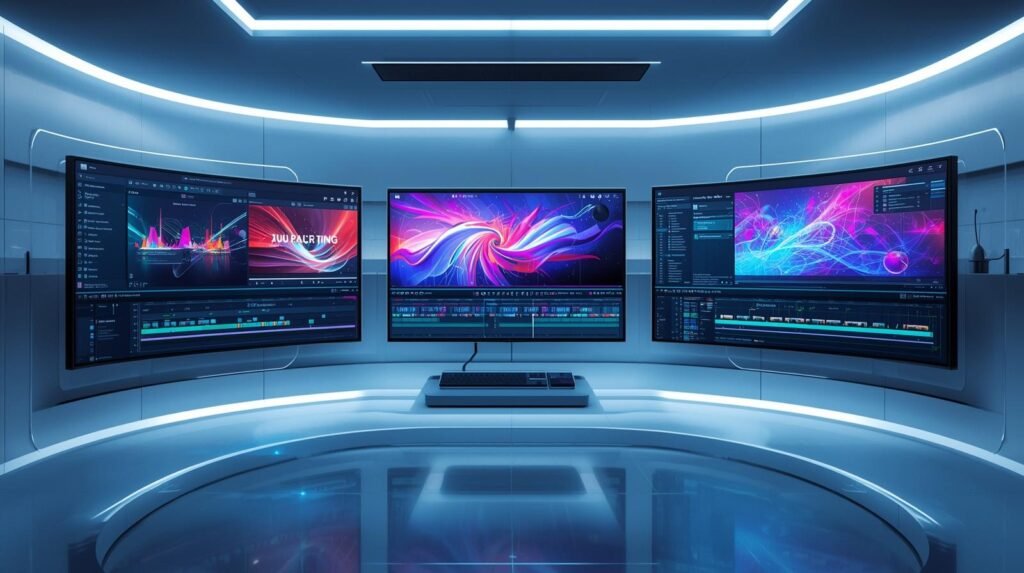
AI Features Included (captions, cut detection, B-roll, voiceover)
Different AI tools come with different capabilities. Useful features include:
- Auto-captioning and subtitles
- Smart cut detection
- AI-generated B-roll
- AI voiceovers and audio cleanup
- Script-to-video conversion
- Text-to-video generation
- Auto color correction
- Background removal
Choose a tool that offers the features that match your content style and goals.
Rendering Speed
Fast rendering is essential, especially for creators producing content frequently. Cloud-based AI tools process videos on powerful servers, often outperforming traditional editors. Always check user reviews for rendering performance, especially if you work with high-resolution footage.
Template Variety and Customization
Templates help creators produce professional content quickly. A good AI tool should offer templates for:
- YouTube videos
- Instagram Reels
- TikTok
- Business ads and promos
- Animated explainers
- Intros and outros
Customization options allow creators to maintain a unique brand style while benefiting from AI’s efficiency.
Export Quality (4K / 8K)
High-quality export options are important. Ensure your AI editor supports:
- Full HD (1080p)
- 4K resolution
- 8K (if needed)
- Multiple aspect ratios such as 9:16, 16:9, and 1:1
This ensures compatibility with different platforms and viewing environments.
Pricing and Subscription Flexibility
AI tools come at various price points. Consider:
- Whether the free plan offers enough features
- The cost of premium effects or add-ons
- Cloud storage limits
- Watermark restrictions
- Monthly vs. yearly subscription options
Choose a tool that offers the best value for your budget.
Collaboration Features for Teams
For creators working in teams, collaboration features are essential. Look for tools offering:
- Multi-user access
- Real-time comments
- Cloud project syncing
- Shared asset libraries
- Version history
These features make it easier to coordinate with editors, designers, and clients.
Best AI Tools for Video Creators and Editors in 2025
1. Runway ML
Best for: advanced editing, VFX, AI-generated videos
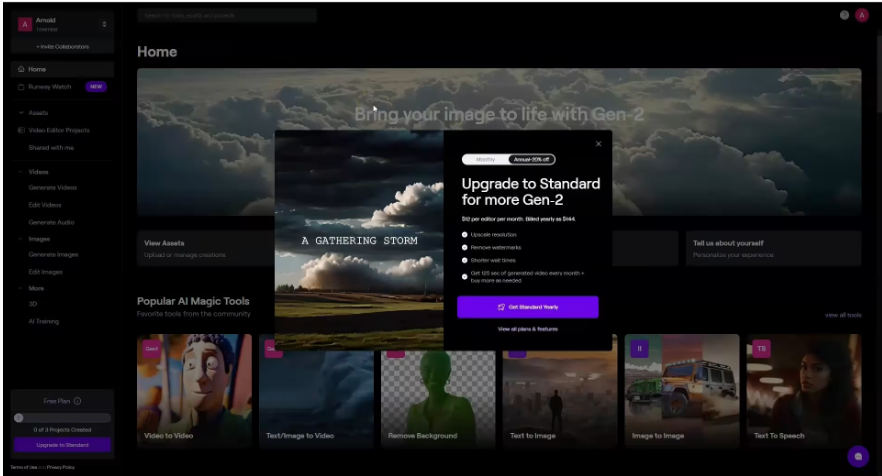
Runway ML is one of the most powerful AI video creation tools available today. It is widely used by filmmakers, editors, animators, and digital artists because it offers features far beyond simple editing. Runway’s strength lies in its ability to generate new footage from text, enhance scenes with AI, and perform complex visual effects tasks without requiring traditional VFX skills.
Features:
Runway offers text-to-video generation, AI green screen removal, motion tracking, object isolation, style transfer, and advanced AI blur tools. Its editor allows users to create cinematic shots, animate characters, and enhance footage using AI-driven effects. These capabilities make it suitable for short films, documentaries, ads, and high-level creative projects.
Why it stands out:
Runway is unique because it bridges the gap between editing and visual effects. Instead of relying on expensive VFX studios, creators can generate custom scenes, add stylized effects, or produce entire video sequences with simple prompts. This creative freedom makes it one of the most groundbreaking tools in modern video production.
Pricing:
Runway offers multiple pricing tiers, starting with a limited free plan and expanding into paid monthly subscriptions with higher generation limits and premium AI models.
2. Descript
Best for: podcasters, YouTubers, talking-head videos
Descript has become a favorite tool for creators who produce educational content, podcasts, interviews, and tutorials. Its standout feature is text-based editing, allowing users to edit videos the same way they edit documents.
Features:
Descript includes Overdub AI voice cloning, filler-word removal, automatic captions, multi-track editing, screen recording, and studio-quality audio cleanup. The tool can remove background noise, fix echo, and detect speaker changes automatically.
Recent improvements:
The latest version introduces better transcript accuracy, smoother timeline controls, and enhanced AI audio processing. Overdub voices have become more natural and expressive, allowing creators to generate narration without re-recording.
Pricing:
Descript offers a free version with limited exports, plus Creator and Pro tiers with additional features like Overdub and unlimited transcription.
3. CapCut AI
Best for: TikTok, Instagram Reels, short-form creators
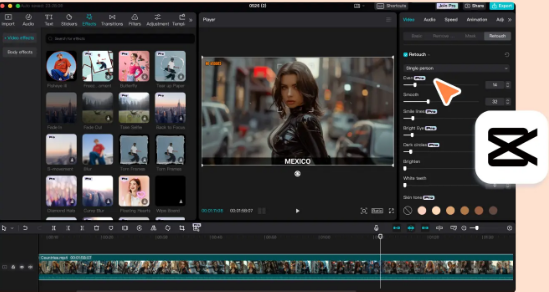
CapCut is the go-to editor for mobile and short-form video creators. Owned by ByteDance, it syncs perfectly with TikTok and supports fast, trend-driven content creation.
Features:
CapCut offers auto captions, trending templates, AI face tracking, background removal, style filters, and powerful AI effects. It also provides beat syncing, motion effects, and text animations designed specifically for viral content.
Why creators love it:
CapCut is fast, intuitive, and optimized for mobile creators who post frequently. The AI tools help users create polished videos in minutes — perfect for influencers, brands, and marketers.
Free vs. Pro:
The free version includes most features with watermarks removed, while CapCut Pro provides premium templates, cloud storage, and advanced AI effects.
4. Adobe Premiere Pro (AI: Firefly & Sensei)
Best for: professional editors
Adobe Premiere Pro remains an industry standard — now powered by Adobe Firefly and Sensei AI. These technologies have transformed the editing experience by automating complex tasks and improving workflow speed.
Features:
Premiere Pro includes auto reframe, scene edit detection, AI audio cleanup, color match, enhanced speech-to-text captions, and smart trimming. AI tools automatically remove background noise, level audio, and adjust color grading to match multiple clips.
Firefly upgrades:
The latest Firefly models allow for generative fill, extended scenes, text-to-video assistance, and smart B-roll recommendations. Professionals can now achieve sophisticated edits faster and with greater precision.
Pricing:
Premiere Pro is available through Adobe’s Creative Cloud subscription, either as a single-app plan or as part of the All-Apps package.
5. Pika Labs (Pika 2)
Best for: AI video generation from text prompts
Pika Labs gained popularity for producing creative, cinematic AI videos that look visually rich. Its Pika 2 model allows users to craft scenes, characters, and motion styles directly from short prompts.
Features:
Pika includes character consistency, dynamic camera motion, multiple visual styles, and scene continuity. Users can create animations, storyboards, ads, and artistic shots without filming anything.
Use cases:
Pika is popular among storytellers, animators, marketers, and creators who want to generate visuals without cameras or actors. It can also be used to test concepts, develop prototypes, or create unique social media content.
Pricing:
Pika offers a free tier with daily limits and paid subscriptions with higher generations and premium models.
6. VEEDIO
Best for: online creators & beginners
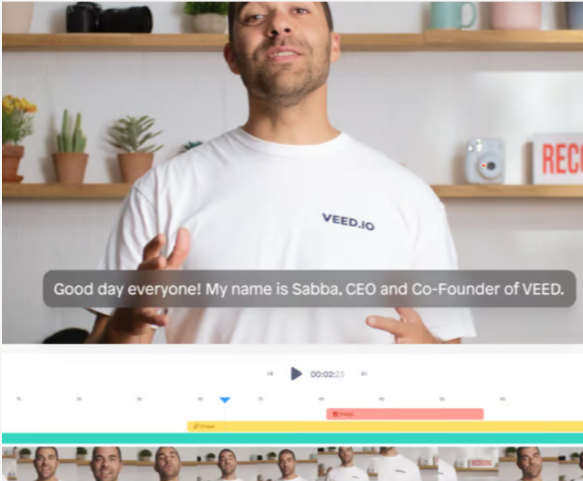
Veed.io is a simple, browser-based video editor designed for creators who need quick edits without downloading any software.
Features:
It includes AI subtitles, templates, text-to-speech, auto-cut, background removal, brand kits, and social-media-ready formats. The editor is clean and easy to learn, making it great for beginners.
Cloud-based advantages:
Since everything runs online, creators can edit from any device and collaborate with teammates easily.
Pricing:
Veed.io offers free access with watermarks, plus paid plans with unlimited exports, brand tools, and higher storage.
7. InVideo AI
Best for: automated marketing videos
InVideo AI is widely used by marketers, social media managers, and businesses that need quick promotional videos or ads.
Features:
It offers URL-to-video generation, script-to-video tools, automatic B-roll insertion, templates, voiceovers, and AI-generated video variations.
Why businesses love it:
InVideo makes it easy to create ads, explainers, and social media campaigns without needing a professional editor. Automation speeds up the creation of bulk marketing content.
Pricing:
Free and premium plans exist, with the higher tiers offering watermark-free exports and HD rendering.
8. Wondershare Filmora AI
Best for: beginners who want a simple interface
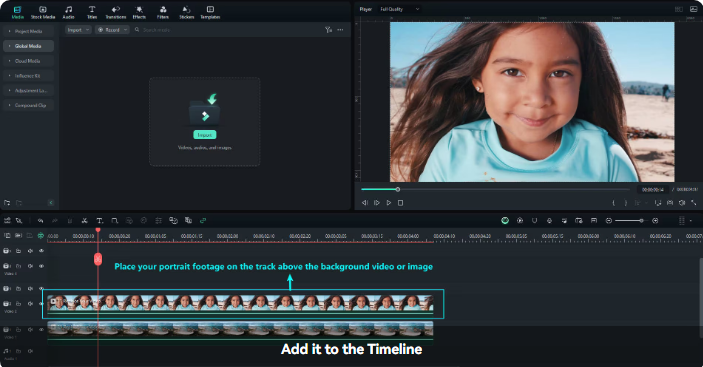
Filmora is a lightweight editor perfect for users who want a friendly interface and reliable AI tools.
Features:
It includes AI smart cutout, stabilization, motion tracking, audio denoising, and preset effects. Filmora also offers drag-and-drop tools, making it ideal for first-time editors.
Lightweight and fast:
It runs smoothly on basic laptops, making it accessible for creators without high-end hardware.
Pricing:
Filmora provides both subscription and lifetime license options.
9. Lumen5 AI
Best for: content repurposing
Lumen5 is designed for turning text content into videos, making it a powerful tool for marketers and bloggers.
Features:
It converts blog posts, articles, and social content into engaging videos using AI-selected visuals and animation styles.
Perfect for marketers:
Brands use Lumen5 to convert long-form content into social posts, explainer videos, and ads quickly.
Pricing:
Available in multiple paid tiers, with enterprise options for teams.
10. ElevenLabs + AI Video Editors (for Voiceovers)
Best for: realistic AI voiceovers
ElevenLabs is known for producing some of the most human-like AI voices available today.
Features:
It offers multilingual voice cloning, emotional tones, natural pacing, and seamless integration with video tools.
Why creators use it:
It allows creators to produce high-quality narration without hiring voice actors or recording audio themselves. Perfect for YouTubers, educators, and marketers.
Pricing:
Includes a free tier plus paid plans with higher character limits and cloning options.
Best AI Tools for Specific Use Cases
AI video tools are no longer one-size-fits-all. Different creators have different needs—some want advanced controls, others need simple drag-and-drop editing, and agencies demand speed plus scalability. This section breaks down the best tools for each use case so you can choose the perfect fit for your workflow.
Best Free AI Video Editing Tool (CapCut / DaVinci Resolve AI)
When it comes to free AI video editing, two tools dominate: CapCut and DaVinci Resolve. They serve very different audiences but are equally powerful in their own way.
CapCut is ideal for beginners, mobile editors, and short-form creators. The tool offers automated captioning, background removal, face enhancement, filters, templates, and AI-generated effects at no cost. It also integrates seamlessly with TikTok, which makes exporting in the right format extremely easy. What makes CapCut so appealing is its simplicity—almost every editing task can be done with a single click, making it the best choice for anyone who wants fast results without learning traditional editing.
DaVinci Resolve, on the other hand, is a professional-grade editor used by filmmakers and YouTubers who want full control. Its AI features—like Magic Mask, Smart Reframe, and automated noise reduction—make high-level editing accessible at zero cost. The free version is powerful enough for most creators, and the interface is designed for advanced workflows, color grading, and cinematic projects.
Creators who want a lightweight, automated experience should choose CapCut, while those aiming for professional quality and detailed edits will benefit more from DaVinci Resolve.
Best for YouTube Creators (Descript + Premiere Pro)
YouTube creators need tools that can handle long-form content, complex edits, and high-quality exports. Two tools stand out for this: Descript and Adobe Premiere Pro with AI enhancements.
Descript is a game changer for talking-head videos, tutorials, podcasts, and interviews. It turns video editing into text editing—delete a sentence from the transcript, and the video automatically updates. With features like AI voice cleanup, text-based editing, automatic filler-word removal, and multi-track editing, Descript helps creators cut editing time dramatically. It’s especially useful for YouTubers who record long scripts or frequently make educational content.
Premiere Pro remains the industry standard for YouTube channels that want maximum control. Its AI tools—such as Auto Reframe, Enhance Speech, and Scene Edit Detection—reduce manual work and speed up production. YouTubers also benefit from its integration with Photoshop, After Effects, and Audition, creating a smooth, end-to-end workflow for high-quality videos.
The combination of Descript for fast rough cuts and Premiere Pro for final polishing gives YouTube creators the best of both worlds: speed and precision.
Best For Short-Form Video Creators (CapCut / Veed.io)
Short-form creators—whether making content for TikTok, Reels, or YouTube Shorts—need tools that deliver speed, trends, and automation. CapCut and Veed.io are the top picks for this space.
CapCut leads because of its trend-driven templates and powerful mobile editing features. Creators can remove backgrounds, add AI captions, apply transitions, and sync clips to music instantly. It’s also directly connected to TikTok, allowing creators to publish without downloading or reformatting. CapCut handles everything from beauty enhancement to beat-syncing, making it perfect for viral-ready videos.
Veed.io is better suited for creators who want fast, browser-based editing with clean, minimal interfaces. It’s especially strong for online businesses, coaches, and influencers who need to make short promo videos or reels using templates. Veed offers AI captioning, brand kits, auto-cutting, screen recording, and easy resizing for multiple platforms.
For creators who value speed, aesthetic templates, and convenience, CapCut is unbeatable. For those who prefer a cleaner, web-based editor with branding features, Veed.io is the stronger choice.
Best For Agencies and Marketers (InVideo / Lumen5)
Agencies and marketers require tools that can scale, produce large volumes of content quickly, and maintain consistent branding. InVideo and Lumen5 are standout solutions built specifically for business-focused video creation.
InVideo is ideal for agencies that need to create ads, social media videos, explainers, and branded clips. It comes with thousands of templates, AI script-writing assistance, automated voiceovers, and easy drag-and-drop editing. Teams can collaborate, leave comments, and create multiple versions of the same video for different platforms with minimal effort. InVideo is especially useful for small agencies that need to produce content for several clients at once.
Lumen5 turns blog posts, marketing articles, and social media copy into videos automatically. This is perfect for content marketing teams and businesses focused on repurposing text content into engaging visuals. With AI-selected stock footage, brand kits, and automated scene layouts, Lumen5 dramatically speeds up the creation of professional marketing videos.
Agencies that need versatility should choose InVideo, while teams focused on repurposing content can rely on Lumen5 for fast, consistent outputs.
Best Text-to-Video Generator (Runway / Pika Labs)
For creators who want to generate entire videos from text prompts, Runway and Pika Labs are leading the charge. These platforms allow you to type a description—such as “a futuristic city at sunset” or “a character walking through a neon alley”—and produce fully animated scenes.
Runway is known for its advanced Gen-2 and Gen-3 models, delivering cinematic video outputs with realistic motion. Users can generate scenes, animate still images, create green-screen effects, and even edit videos using text commands. It has become a top choice for filmmakers, animators, and brands experimenting with AI-driven storytelling.
Pika Labs focuses on smooth animations, fast generation, and creative flexibility. It’s especially popular among motion designers and social media creators who want quick, visually striking AI scenes. Pika’s interface is simple, and the tool offers impressive detail and motion control.
For creators exploring new forms of storytelling, experimenting with concepts, or producing animation-style videos without traditional skills, text-to-video tools like Runway and Pika Labs open an entirely new world of possibilities.
Comparison Table — AI Video Editing Tools (2025)
Here’s a comparison table summarizing the AI video editing tools, along with their best use cases, key features, pricing, ease-of-use, and who they are best for. This gives a high-level view to help you decide which tool suits your needs most.
| Tool | Best Use Case | Key Features | Pricing | Ease of Use | Who It’s Best For |
|---|---|---|---|---|---|
| Runway ML | Advanced editing, VFX & AI-generated video | Text-to-video & video-to-video generation, AI green screen & background removal, motion tracking, style transfer, upscaling & video enhancement | Free (limited credits + watermark + 720p) → Standard (~ $12–15/mo) for 625 credits and 4K export → Pro (or higher) for 2,250+ credits, high-res exports, custom assets/voices | Moderate — interface is powerful but many features, so some learning curve | Creators needing cinematic visuals, VFX, experimental animation or generative video; freelancers and small studios |
| Descript | Talking-head videos, tutorials, podcasts, interviews | Text-based editing (edit the transcript → edits video automatically), transcription, Overdub AI voice cloning, filler-word removal, captions, screen recording, audio cleanup | Freemium (limited features) → Creator / Pro tiers (~ $15–30/mo) for full transcription, overdub and export tools | High — very intuitive, especially for those comfortable editing text rather than video timelines | YouTubers, educators, content creators who produce scripted or spoken-word videos |
| CapCut | Mobile & short-form social content (TikTok, Reels, Shorts) | Auto-captions, trendy templates, AI effects, background removal, face filtering & enhancement, beat syncing, mobile-first editing | Free plan widely available; Pro version unlocks premium templates, cloud storage and advanced effects | Very easy — built for mobile users with drag-and-drop and quick editing flow | Influencers, social media marketers, creators needing fast production for short clips |
| Veed.io | Online video editing; quick social clips & promos | Browser-based editing, AI subtitles, auto-cut, templates, text-to-speech, resizing for different platforms, brand kits | Freemium (with watermark / limited export) → paid plans for full features & watermark-free exports | High — intuitive interface, no installation needed | Beginners, marketers, small businesses, social media content producers needing quick edit & publish |
| InVideo | Marketing videos, social promos, brand content | Script-to-video, URL-to-video conversion, AI B-roll insertion, templates, stock media integration, voiceover | Free tier exists (watermarked) → Basic / Pro plans for watermark-free HD exports and full features | Moderate — easy enough for marketers; more control than simple mobile apps | Agencies, marketing teams, businesses producing frequent promo/ads/social content |
| Lumen5 | Repurposing blog posts or text content into video (e.g. marketing, social) | Converts articles/scripts into video: auto scene + stock clip selection, templates, brand kits, simple editing | Plans start modestly (with free or low-tier options), with higher tiers for HD export and advanced features | High — very beginner friendly, minimal video skills required | Bloggers, content marketers, businesses needing to turn long-form text into engaging video content |
| Pika Labs | Fully AI-generated video from text — animation, concept clips, creative visuals | Text-to-video generation, stylized visuals, animated scenes, camera motion replication, prompt-based creativity | Free tier (with limits) → Paid tiers for longer clips, higher quality and better export options | Moderate — easier than full VFX suites but requires learning prompt-based generation | Creators experimenting with generative video, marketers needing quick visual concepts, social media animators |
| Adobe Premiere Pro (with AI via Firefly & Sensei) | Professional edit & production — YouTube, documentaries, commercial videos | Auto-reframe, scene edit detection, AI audio cleanup, color match, auto captions, integration with other Adobe tools | Subscription-based (as part of Adobe Creative Cloud) — pay-per-month or per-year depending on plan | Moderate to advanced — powerful tools but some learning curve typical of professional software | Professional editors, content studios, creators who need full control + AI assistance |
| Wondershare Filmora (with AI features) | Beginners and semi-pro editors wanting simple interface | AI smart cutout/background removal, video stabilization, audio denoise, basic editing + effects | Free trial / freemium; paid plans or one-time license for full features | High — user-friendly, with easy drag-and-drop workflow | Entry-level creators, lecturers, educators, anyone needing straightforward video editing without complexity |
Future of AI Video Creation in 2025 and Beyond
More Realistic AI Video Generation
AI-generated video is quickly becoming indistinguishable from real footage. Tools that once produced blurry or surreal visuals now generate scenes with consistent characters, accurate lighting, smooth motion, and lifelike textures. As models grow larger and more efficient, creators will see AI tools capable of producing entire cinematic sequences from a single paragraph of text. This shift reduces the need for expensive cameras, large crews, or physical sets, allowing independent creators, educators, and marketers to produce high-quality visuals at a fraction of the cost. The boundary between real and AI-generated content will continue to blur, expanding creative possibilities for storytellers, advertisers, and filmmakers.
Faster Collaboration and Cloud Editing
Traditional editing workflows often require heavy software, high-end computers, and long export times. With the rise of cloud-based AI editing platforms, teams can now collaborate in real time from different locations. Editors, scriptwriters, and clients can join the same project, make updates instantly, leave comments, and review changes without waiting for downloads or exports. Cloud rendering removes the burden on local machines, allowing creators to edit 4K and even 8K videos from lightweight laptops or tablets. This evolution makes video creation more flexible for global teams, freelancers, digital agencies, and remote creators.
AI Taking Over 80% of Manual Editing Steps
Most of the repetitive tasks in video production—such as trimming clips, removing filler words, generating subtitles, matching color tones, cleaning audio, and choosing B-roll—are now automated by AI. Editors no longer spend hours sorting footage or syncing audio; the AI handles the busy work while they focus on storytelling and creativity. This shift allows beginners to produce professional-looking videos quickly and helps professionals complete client projects in a fraction of the time. Instead of replacing editors, AI increases productivity by reducing tedious tasks and improving creative output efficiency.
Rise of Completely AI-Generated Films
The future of filmmaking will see a surge in fully AI-generated films. These projects will combine text-to-video generation, AI voiceovers, motion design tools, and automated editing workflows. Independent film creators will be able to produce short films, animated stories, and experimental cinema without expensive equipment, actors, props, or physical shooting locations. Major studios have already begun exploring AI for storyboard generation, scene simulation, and script development. In the coming years, entire productions—complete with characters, dialogue, environments, and special effects—may be created using AI as the primary engine. This trend will open new opportunities for creative storytelling, global content production, and niche filmmaking.
Final Thoughts
AI has transformed video creation, offering tools that simplify editing, automate repetitive tasks, and unlock new levels of creativity. Whether you’re producing social media clips, YouTube tutorials, marketing videos, or cinematic visuals, modern AI tools can help streamline your workflow and enhance your final output. From text-to-video generation to auto-captioning and cloud editing, creators now have access to features that were once exclusive to professional studios.
Best tool for beginners:
CapCut, Veed.io, and Filmora are ideal for those starting their video editing journey. They offer templates, auto-captions, drag-and-drop interfaces, and smart automation features that help beginners create polished videos with little technical skill. They’re also affordable and accessible on mobile or web, making them perfect for social media creators.
Best tool for professionals:
Adobe Premiere Pro, Runway ML, and Descript stand out for advanced users. Premiere Pro provides full control over complex video timelines; Runway ML offers cutting-edge generative video and VFX; Descript is ideal for long-form content creators who want fast, text-based editing. These tools deliver professional-grade output and integrate seamlessly into larger studio workflows.
Creators are encouraged to experiment with multiple AI tools. Each platform brings something unique—from generative visuals to automated editing, smart subtitles, and collaborative cloud workflows. Trying different tools helps you find the perfect combination for your content style, budget, and production needs.
Closing remark:
AI video creation is only getting more powerful. Whether you’re a beginner or an experienced editor, embracing these tools today prepares you for the future of digital content. The next wave of video storytelling belongs to those who learn to collaborate with AI—and use it to create faster, smarter, and more creatively than ever before.
Frequently Asked Questions (FAQs)
Are AI video editing tools replacing human editors?
No. AI tools automate repetitive tasks like cutting clips, generating captions, and cleaning audio, but human creativity, storytelling, and decision-making remain essential. AI enhances productivity rather than replacing editors entirely.
What is the best AI video editing tool for beginners?
CapCut, Veed.io, and Filmora are the best choices for beginners. They are easy to learn, offer templates, and automate complex editing steps. They also work well for short-form videos and quick social content.
What AI tool is best for generating videos from text?
Runway ML and Pika Labs are the top platforms for text-to-video generation. They create lifelike scenes, animations, and visual sequences based on written prompts.
Are AI video tools expensive?
Many AI video tools offer free tiers, and paid plans vary depending on features. Beginners can start with free versions of CapCut, Veed.io, or InVideo. Advanced platforms like Runway or Adobe Premiere may cost more, but they offer professional-level control.
Can AI tools edit 4K or 8K videos?
Yes. Most modern AI editors support high-resolution exports. Cloud-based tools can process 4K and 8K videos even on low-spec devices, making high-quality production accessible to more creators.