Faceless storytelling videos are everywhere right now—and for good reason. They allow creators, educators, and brands to tell powerful stories without showing their face, using visuals, motion, text, and sound to do the heavy lifting. From motivational stories and short documentaries to explainer content and narrated visuals, faceless videos are perfect for creators who value privacy or simply prefer letting the story speak for itself.
This is where VideoExpress AI shines.
VideoExpress AI makes it easy for beginners to create faceless storytelling videos using simple text prompts. No camera setup. No acting. No complex editing timeline to learn. Just clear steps and creative control.
In this guide by AI Tutor Labs, you’ll learn how to create faceless storytelling videos using VideoExpress AI, step by step. The process is very similar to creating YouTube Shorts—but this time, the focus is on landscape (16:9) videos, which are ideal for YouTube, blogs, presentations, and long-form storytelling.
What Is VideoExpress AI?
VideoExpress AI is an AI-powered video creation tool that turns text prompts into animated video scenes. Instead of filming footage or editing clips manually, users describe what they want to see and how it should move, and the AI generates the video automatically.
This makes VideoExpress AI especially useful for faceless content, where visuals, motion, and atmosphere matter more than on-camera presence.
If you’re new to the platform, this beginner guide explains how everything works in simple terms: What Is Video Express AI and How Does It Work? (Beginner Guide).
Why VideoExpress AI Is Perfect for Faceless Storytelling
Faceless storytelling often sounds harder than it actually is. Beginners usually worry about things like:
- “Will the video feel boring without a face?”
- “Do I need advanced editing skills?”
- “How do I create emotion with just visuals?”
VideoExpress AI solves these problems by focusing on scene creation and motion. Instead of worrying about filming, creators focus on describing scenes and actions. The AI handles camera movement, visual flow, and timing.
Another big advantage is format flexibility. While many tools focus on vertical videos, VideoExpress AI supports landscape (16:9), which is ideal for storytelling videos on YouTube and other platforms where viewers expect a cinematic feel.
Prepare Your Story Script Before Creating the Video
Even faceless videos need structure. A simple script keeps the story focused and helps the AI generate better scenes.
The script doesn’t need to be long. For storytelling videos, it’s often broken into short parts, with each part becoming a scene.
AI tools like ChatGPT or Grok are excellent for this. A simple prompt like “Write a short emotional story about resilience after failure” can produce a usable script in seconds.
Here’s a simple storytelling structure example:
- Opening scene that sets the mood
- Middle scene that shows conflict or tension
- Final scene that delivers the message or resolution
Understanding how text prompts become visuals is key to better results. This guide explains it clearly: Text to Video AI Explained: How Prompts Turn into Videos.
Step-by-Step: Creating Faceless Storytelling Videos Using VideoExpress AI
Let’s walk through the full process, using landscape orientation (16:9) and three example scenes for clarity.
Step 1: Log in to VideoExpress 2.0
Visit app.videoxpress.ai and log in to the VideoExpress 2.0 dashboard. The interface is clean and beginner-friendly, making it easy to locate creation tools without confusion.
Step 2: Click “Create Video from Prompt”
From the dashboard, click “Create Video from Prompt.” This option allows you to generate videos directly from text—perfect for storytelling without recorded footage.
Step 3: Select Landscape (16:9) Orientation
Choose Landscape (16:9) as the video orientation.
This step is important. Landscape format works best for:
- Faceless storytelling videos
- YouTube long-form or cinematic content
- Educational and documentary-style visuals
Choosing the correct orientation early ensures the video looks natural and professional.
Step 4: Create Scene 1 – Setting the Mood
Now it’s time to enter the image scene prompt for the first scene.
Example Scene 1 (Opening / Mood Setting):
“A quiet city street at dawn, empty roads, soft fog, muted colors, cinematic lighting, realistic style.”
After entering the prompt, you can click “Enhance Prompt” to improve visual detail. For beginners, enabling “Automatically Enhance My Image Prompt” is highly recommended—it helps refine prompts every time.
Once generated, the image appears in the preview area.
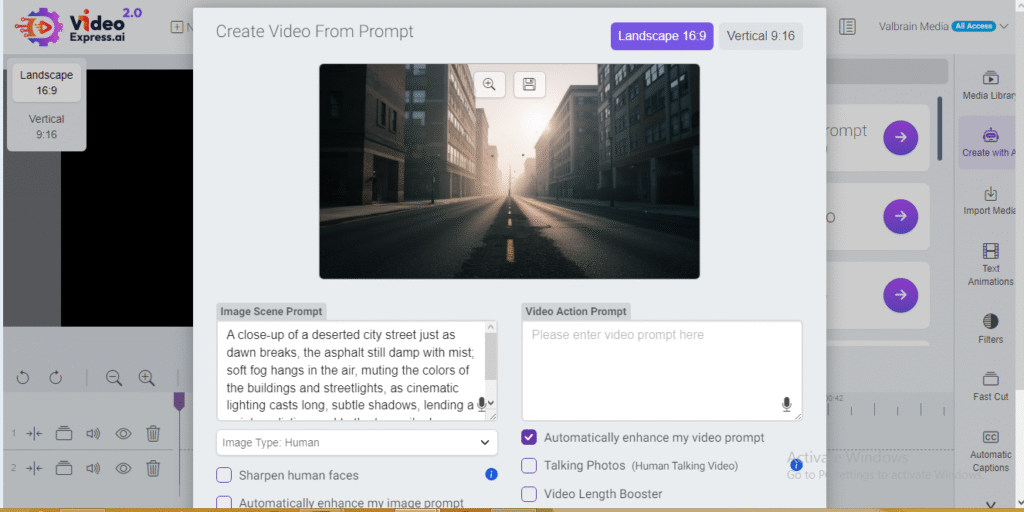
Next, enter the Video Action Prompt, such as:
“Slow camera pan forward with gentle fog movement and soft light changes.”
Click “Create Video.”
This scene sets the emotional tone without showing a single face.
Step 5: Create Scene 2 – Conflict or Change
Repeat the process for the second scene.
Example Scene 2 (Conflict / Tension):
“A lone figure walking away from a broken bridge at sunset, dramatic sky, strong contrast lighting, cinematic atmosphere.”
For the Video Action Prompt, try:
“Subtle camera shake, slow zoom-in, moving clouds in the background.”
This scene visually represents struggle or transition, a key element in storytelling.
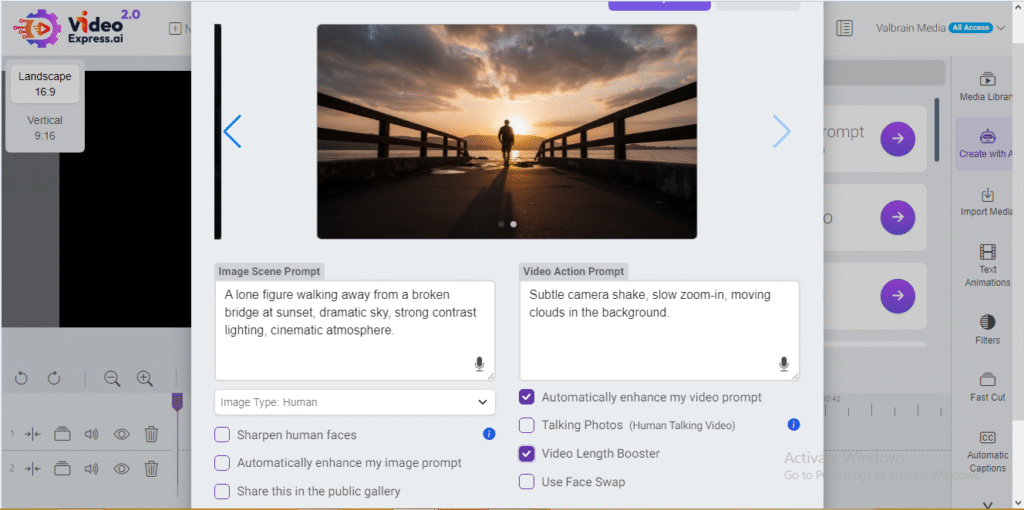
If the story needs more time, enable the Video Length Booster to extend the scene naturally.
Step 6: Create Scene 3 – Resolution or Message
Now create the final scene that delivers the message.
Example Scene 3 (Resolution / Hope):
“Sunrise over a mountain peak, warm golden light breaking through clouds, peaceful and uplifting mood, cinematic style.”
Video Action Prompt:
“Smooth upward camera movement with light rays slowly expanding.”
This final scene provides emotional closure and reinforces the story’s theme.
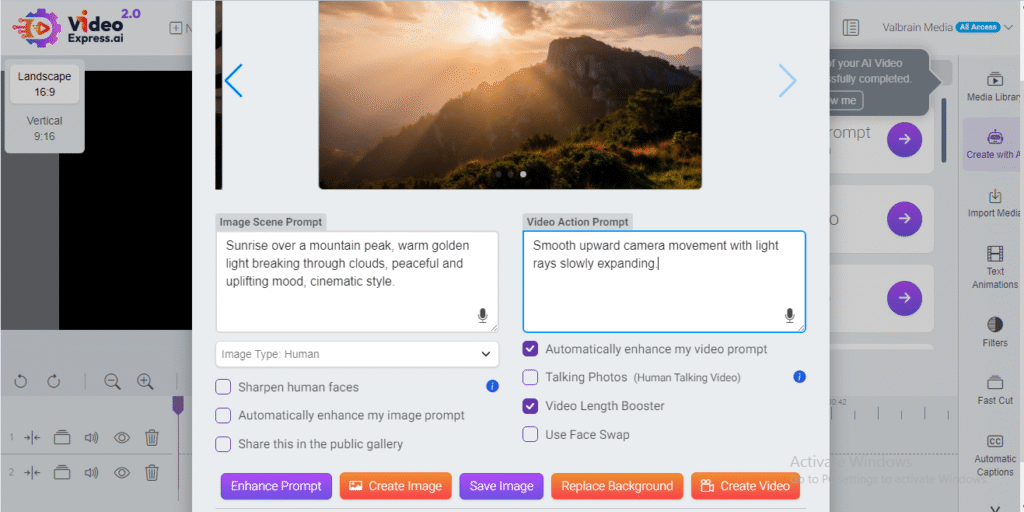
Once each scene is generated, notifications will confirm completion. All videos appear in the library, ready for preview and editing.
Editing and Final Touches
After generating all scenes, they can be arranged using VideoExpress AI’s built-in timeline. This allows creators to:
- Combine multiple scenes into one story
- Add transitions between scenes
- Include background music or sound effects
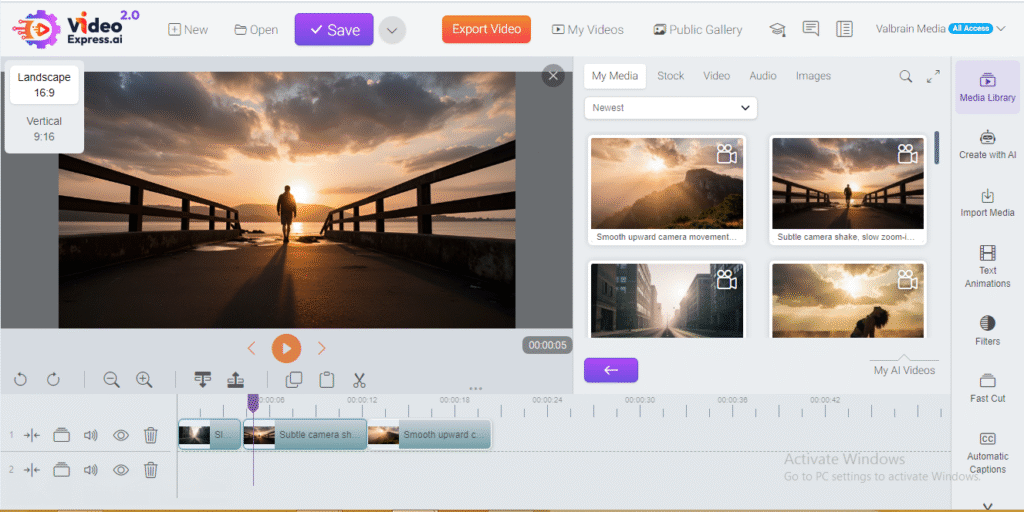
For creators who want more control, videos can also be downloaded and edited in tools like CapCut. This is useful for adding captions, voiceovers, or branding elements.
Both approaches work well—the choice depends on how polished the final video needs to be.
Common Beginner Mistakes in Faceless Storytelling Videos
Beginners often make small mistakes that affect storytelling impact. Common ones include:
- Using vague prompts that lack atmosphere
- Making scenes too short to feel emotional
- Forgetting to maintain a consistent visual style
These issues are easy to fix with better prompts and pacing. A full breakdown of common AI video mistakes is available here: AI Video Mistakes Beginners Make (And How to Fix Them).
Is VideoExpress AI Worth It for Faceless Storytelling?
For beginners, VideoExpress AI offers an excellent balance of simplicity and creative freedom. The learning curve is gentle, the interface is intuitive, and the prompt enhancement features reduce trial-and-error.
For faceless storytelling, the ability to create cinematic landscape scenes quickly is a major advantage. Instead of focusing on cameras and editing software, creators focus on ideas and narratives.
A detailed breakdown of features, pricing, and alternatives is covered here: Video Express AI Review (2026): Features, Pricing, Use Cases, and the Best Alternative.
Conclusion
Faceless storytelling videos prove that powerful content doesn’t require being on camera. With the right scenes, motion, and structure, stories can connect deeply with viewers—sometimes even more than face-based videos.
VideoExpress AI makes this process accessible for beginners by turning simple text prompts into cinematic, landscape videos. With a bit of experimentation and creativity, anyone can build compelling faceless storytelling content without technical stress.
For creators ready to explore storytelling without showing their face, VideoExpress AI offers a practical and beginner-friendly way to start creating with confidence.
Frequently Asked Questions
1. What are faceless storytelling videos?
Faceless storytelling videos are videos that communicate a story, idea, or message without showing the creator’s face. They rely on visuals, motion, text, sound, and narration to engage viewers, making them ideal for creators who prefer privacy or want a cinematic style.
2. Is VideoExpress AI good for making faceless videos?
Yes. VideoExpress AI is especially suited for faceless videos because it focuses on scene creation and motion rather than on-camera footage. Creators can generate cinematic visuals using text prompts and build complete stories without recording themselves.
3. What video format works best for faceless storytelling?
Landscape (16:9) format works best for faceless storytelling videos. It provides a cinematic feel and is ideal for YouTube, educational content, and story-driven videos where visuals and atmosphere matter.
4. Do faceless videos need voiceovers?
Voiceovers are optional. Faceless storytelling videos can work with background music and on-screen text alone. However, adding a voiceover often improves clarity and emotional connection, especially for longer or more complex stories.
5. Can beginners create faceless storytelling videos with no editing experience?
Absolutely. VideoExpress AI is designed for beginners. Features like prompt enhancement, built-in previews, and simple editing tools allow new users to create professional-looking faceless videos without prior editing skills.